Fedora i3 on an RTX 4070 just works
Contents
Windows broke on me again this week, and I was already tired of everything it installs that I didn’t ask for. The machine needed a refresh anyway. So instead of reinstalling Windows, I wiped it and put Fedora 44 i3 Spin on my gaming PC. No desktop environment, just a tiling window manager on a machine with an Nvidia card and three monitors.
Is that a sensible thing to do to the machine I play WoW on and study for the CCNA on? There’s only one way to find out.
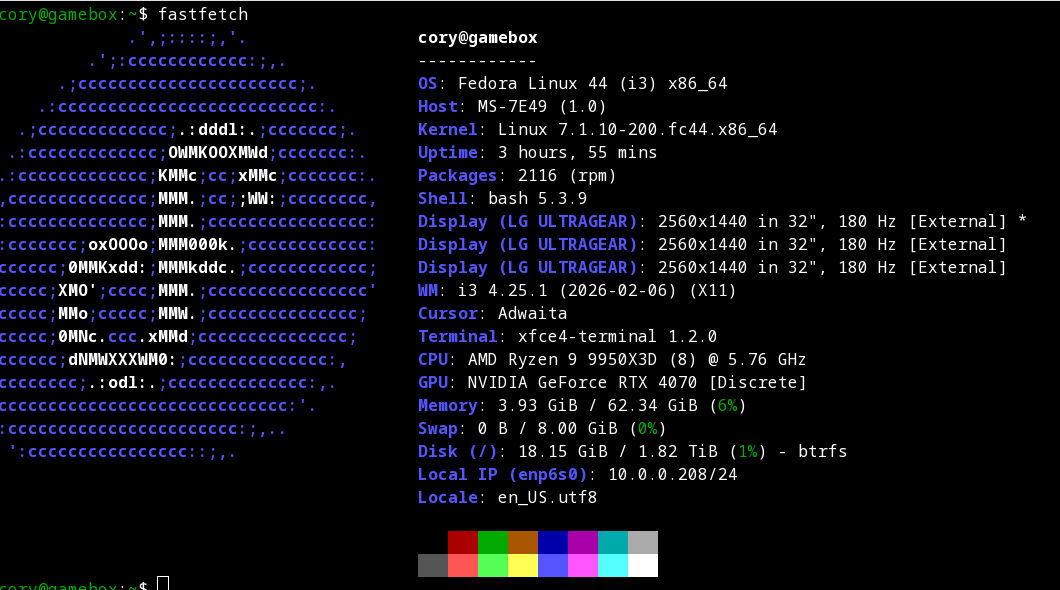
For context: the box is a Ryzen 9 9950X3D, 64 GB of DDR5, an RTX 4070, and three 1440p 180 Hz panels over DisplayPort. Nothing here was sponsored or loaned; it’s the same PC I already had, minus Windows.
Why Fedora, and why X11
Before anyone says it: yes, I know about Hyprland. I looked at Omarchy and CachyOS first.
The deciding factor was the 4070. Every Wayland-on-Nvidia horror story I read (cursor lag across monitors, lock screens crashing on wake…) came from Hyprland or Sway users, and I wanted a machine that doesn’t need babysitting. The proprietary driver on X11 is the boring, mature option, and i3 has been the same window manager since 2009.
The other reason is refresh rates. X11’s real weakness is mixed refresh across displays, and all three of my panels are identical, so that weakness doesn’t apply.
Fedora itself was the ‘fresh but tested’ pick: new kernels and drivers within weeks, but with QA in front of them. It also happens to be the RHEL family, which is a nice bonus for a job that runs on RHEL. I’m on kernel 7.1.10 as of this writing.
The Nvidia part
This was the part I expected to fight with. It went off without a hitch.
After adding RPM Fusion, I forced the open
kernel modules (the right choice for a 40-series card) and installed
akmod-nvidia:
sudo sh -c 'echo "%_with_kmod_nvidia_open 1" > /etc/rpm/macros.nvidia-kmod'
sudo dnf install akmod-nvidia xorg-x11-drv-nvidia-cuda
The only flag that matters is that macro line. Without it you may get the proprietary kernel module, which also works, but the open one is what Nvidia now recommends for Ada.
I kept Secure Boot on and enrolled the akmods signing key through MOK
(Machine Owner Key) instead of turning Secure Boot off in the BIOS.
One reboot and one password at the blue MOK screen. Driver 610.57.04
came up with CUDA 13.3 available, and modinfo -F license nvidia
reports Dual MIT/GPL, so it’s the open module.
Three monitors at 2560x1440 took one trip through nvidia-settings,
saved to /etc/X11/xorg.conf. xrandr reports 179.96 Hz on all
three, which is close enough to 180 that I’m not going to argue.
i3, and making it feel like a desktop
The i3 spin ships almost nothing, which is the point. At the desktop with Firefox open, the whole system uses about 3.5 GB of the 64 GB.
The things I added, in order:
picom with unredir-if-possible so
the compositor gets out of the way when a game is fullscreen,
i3blocks for a status bar,
rofi as a launcher and window
switcher, nitrogen for wallpapers,
and Thunar because
sometimes I want to drag a file.
The bar lives on the right-hand monitor only and shows CPU, GPU, RAM,
and the clock. Each stat turns yellow and then red at thresholds I
picked (CPU at 40% and 75%, GPU at 50% and 85%, RAM at 50% and 80%).
The GPU number comes straight from nvidia-smi every 3 seconds.
i3 has no minimize. What it has is the scratchpad, which turned out to
be the thing I use most: Super+Shift+minus hides a window,
Super+minus brings it back, and Super+Tab opens a rofi list of
every window I have open. That’s a better taskbar than the one I left.
WoW Classic
Lutris installed Battle.net in about five minutes, and WoW Classic installed from there like it would on Windows. Wine 11.0 with DXVK, DirectX 11 in the game settings, V-Sync off, foreground FPS capped at 175 so frametimes stay under the 180 Hz refresh.
Does it run? It sits at the 175 FPS cap everywhere I’ve been so far, cities included! Classic barely loads the 4070; the GPU block on my bar stays green.
Mouse was jittery for the first ten minutes until I turned on raw input from the chat box:
/console rawMouseEnable 1I also installed Questie
v11.37.1 by unzipping it into the Wine prefix’s Interface/AddOns
folder.
The lab side
This is also my CCNA machine, so it needs to be a real workstation. So far: Neovim 0.12.5 with LazyVim, git and the GitHub CLI over SSH, KeePassXC, and Hugo for this site.
I ran a pair of audit scripts at the end to see what I’d actually
built. SELinux enforcing with zero denials, firewalld running with
only dhcpv6-client allowed, no listening ports except the local
resolver, LUKS on the root volume, zram swap at 8 GB. The NVMe reports
1% wear at 35°C.
Two hardening changes came out of that audit. I turned off LLMNR
(Link-Local Multicast Name Resolution) and mDNS in systemd-resolved
(if you’ve read about Responder attacks, you know why), and I set
dnf5-automatic to apply security updates on its own while I do the
rest weekly by hand.
I also set the CPU energy preference to performance through
tuned’s throughput-performance
profile. amd_pstate was already active, so this is a one-line
change, and idle power on the GPU still sits at 24 W.
What went wrong
In order, with the boring parts:
- The install USB failed its media check at 4.8%. Balena Etcher had written the stick in a mode that alters the ISO. Rewriting it with Fedora Media Writer was the fix, and the check passed.
- Flameshot wouldn’t
take screenshots. It wanted a Wayland portal that doesn’t exist on
a bare X11 session. Replaced it with
maim. - i3 rejected my config twice for duplicate keybindings. The spin’s
default config already had the volume keys and
Super+Ebound. Moved Thunar toSuper+N. - i3blocks silently dropped my CPU and RAM blocks. It mangles
%%inside anawk printf, so the blocks produced nothing and disappeared. Switched toprintwith a literal"%"and small shell scripts. - Questie’s ’latest’ download URL is a 404. The 9-byte file it returned was the text “Not Found.” Pulling the real asset name from the GitHub API fixed it.
- I picked HTTPS in
gh auth loginby accident, so my SSH key never got uploaded and every clone failed withPermission denied (publickey). Onegh ssh-key addlater, fine. dnf5-automaticwanted its config in a different place than the docs I’d read. It warned the old path was deprecated, then was happy at/etc/dnf/automatic.conf.- Fedora 44’s stock wallpapers are two JPEG-XL files, which nitrogen can’t read, and the ’extras’ packages for F38-F40 turned out to be 24 KB of metadata each. I downloaded my own.
- A crash report for
bwrapshowed up on the next boot. It was Steam probing its sandbox on first run. Two reports in the same second, and none since.
None of these took more than 15 minutes. Number 4 took the longest, because the command worked perfectly in a terminal and only failed inside i3blocks.
Conclusion
Bottom line: X11 plus i3 is the low-drama way to run an Nvidia card on Linux in 2026, and Fedora gets you a current kernel without living on a rolling release. I’m not missing Windows on this machine.
The caveat is that ‘minimal’ means you assemble the desktop yourself. I spent more time on the status bar than on the graphics driver, which says good things about the driver and slightly embarrassing things about me.
Still on the bench: the Logitech G29 with new-lg4ff for force feedback, Ollama on the 4070, and the virtualization stack (libvirt, GNS3, and Packet Tracer) for the CCNA labs. Triple-screen racing will also need a second Xorg config with Xinerama on, and I’ll write that up once I’ve made it work.
Or I could just play WoW on the center monitor and call it done ;)