


Plan and implement RDP Shortpath and QoS policies
Every AVD connection starts as TCP 443 through the AVD gateway (reverse connect). RDP Shortpath then tries to set up a direct UDP path between the client and the session host and moves the session onto it. If UDP can’t get through, the session stays on TCP. QoS marks that UDP traffic so network gear can put it first.
The diagram
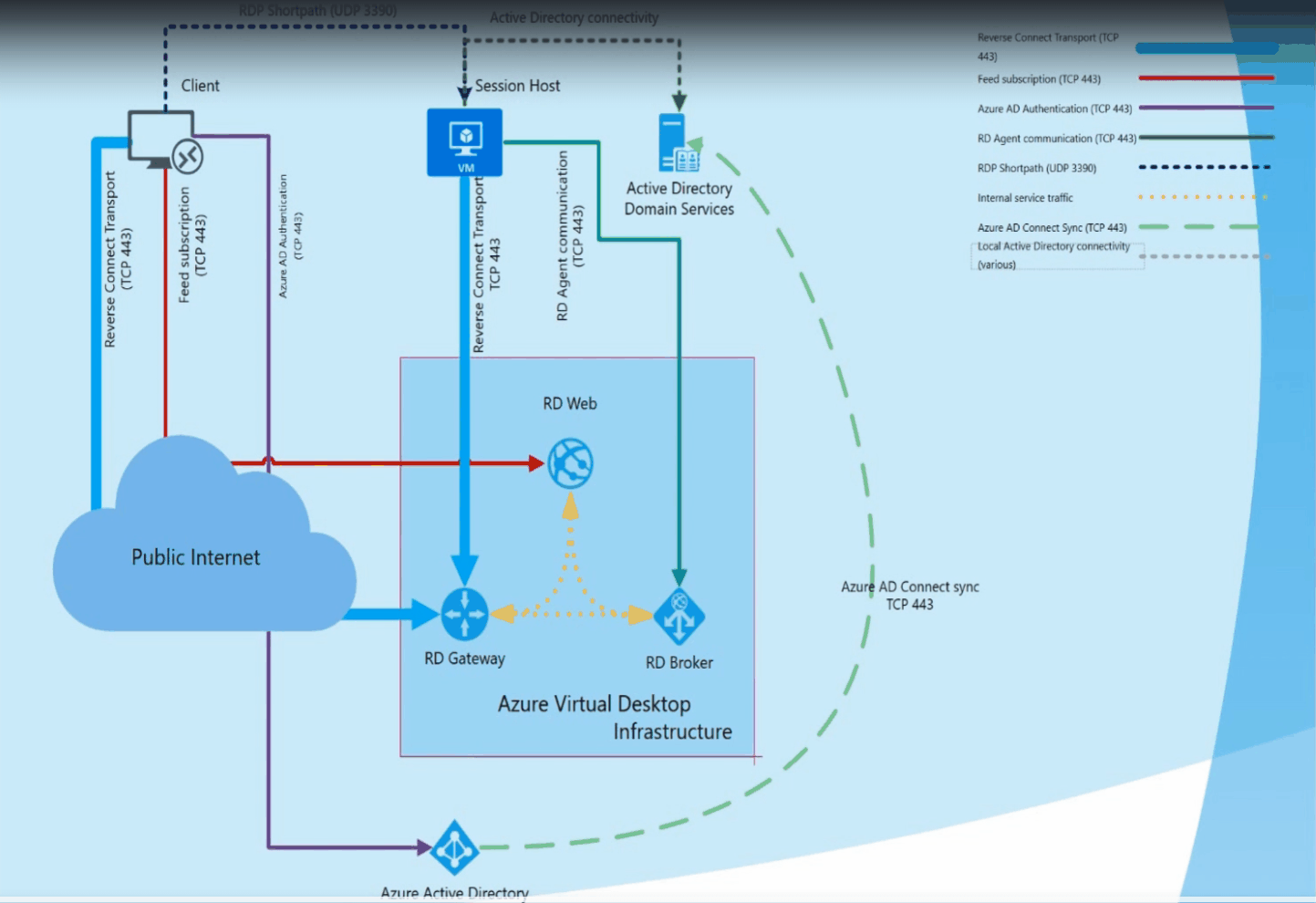
Diagram: Microsoft, RDP Shortpath (older version), as shown in the course.
- Client: reverse connect transport, the feed subscription (the list of desktops and apps the user gets), and Entra ID sign-in, all TCP 443 out to the internet.
- Session host: reverse connect transport and RD Agent traffic, also TCP 443 outbound.
- AVD infrastructure, run by Microsoft: RD Web (web access and the feed), RD Gateway, RD Broker.
- RDP Shortpath (UDP 3390): the direct client to session host path once the session is up.
- Old names in it: Azure AD is now Microsoft Entra ID, Azure AD Connect is Microsoft Entra Connect.
Four kinds of Shortpath
| Type | Path | Setup |
|---|---|---|
| Managed networks | Direct UDP over ExpressRoute or VPN, to a listener on UDP 3390 | Listener policy and an inbound firewall rule |
| Managed networks with ICE/STUN | Direct UDP over ExpressRoute or VPN, dynamic port | None |
| Public networks with ICE/STUN | Direct UDP over the internet | None |
| Public networks via TURN | UDP relayed through Microsoft (UDP 3478) | None |
- The course presents public network support as new. It’s generally available, and the three types without a listener are on by default (in the host pool’s networking settings, with UDP enabled in Windows on both ends).
- Client and session host try the options in parallel and use whichever connects first.
- Over a VPN, a UDP-based VPN works better. A TCP-based one adds TCP congestion control on top of RDP’s own.
Turning on the managed networks listener
The listener runs on the session hosts: the policy lives under Remote Desktop Session Host, and the session host is what listens on UDP 3390.
- Download the AVD administrative template
(aka.ms/avdgpo), then extract the
.caband the.zipinside it. - Copy
terminalserver-avd.admxintoPolicyDefinitionsanden-US\terminalserver-avd.admlintoPolicyDefinitions\en-US. In a domain, use the central store in SYSVOL rather than one DC’sC:\Windows\PolicyDefinitions, so every admin sees it (path below). - An Azure Virtual Desktop folder shows up under Remote Desktop Session Host.
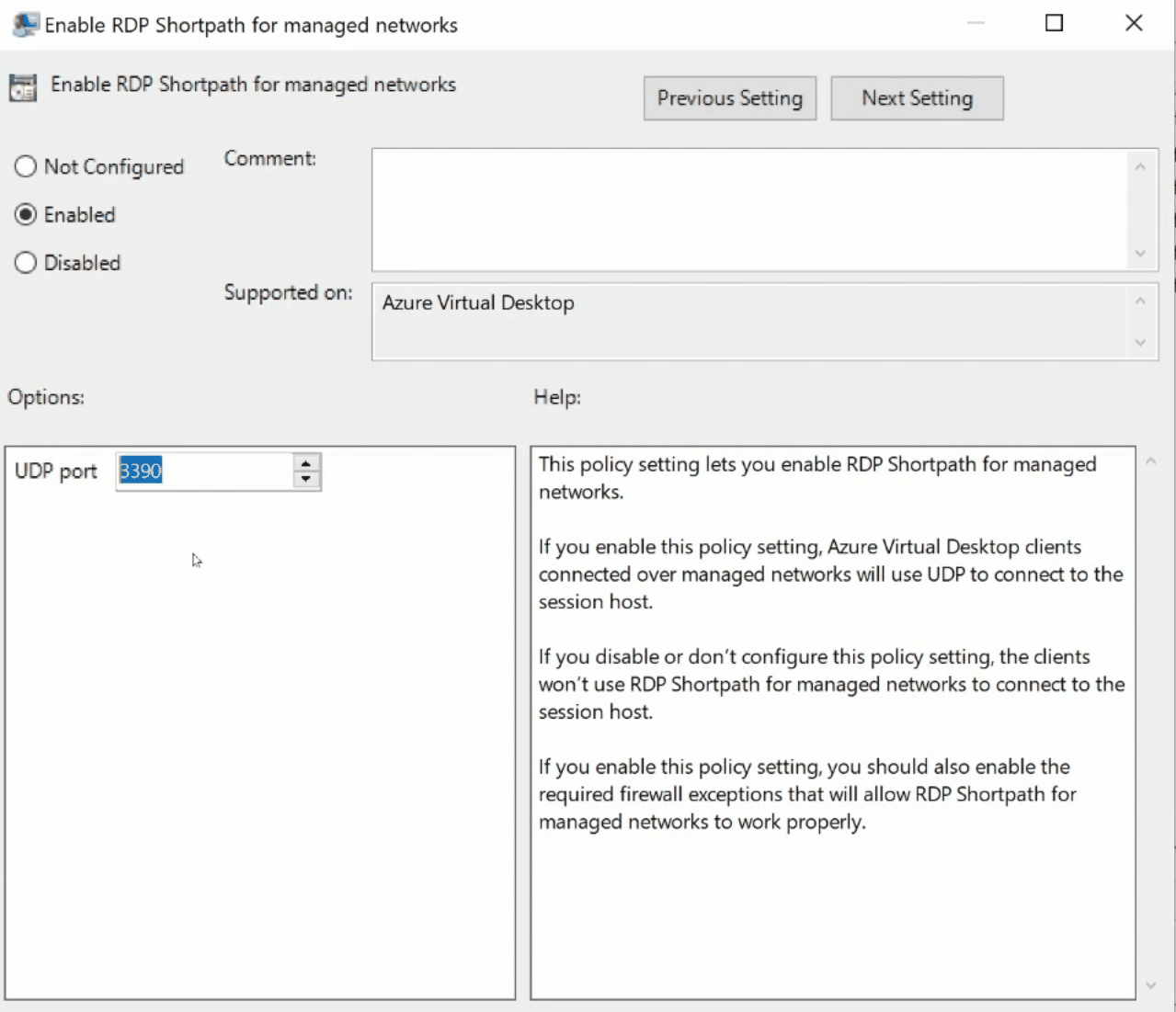
- In a GPO linked to the session hosts’ OU: Computer Configuration → Policies → Administrative Templates → Windows Components → Remote Desktop Services → Remote Desktop Session Host → Azure Virtual Desktop → Enable RDP Shortpath for managed networks → Enabled, UDP port 3390 (the default).
- Allow UDP 3390 inbound to the session hosts, in Windows Firewall and the NSG.
- Restart the session hosts.
\\<domain>\SYSVOL\<domain>\Policies\PolicyDefinitions
\\<domain>\SYSVOL\<domain>\Policies\PolicyDefinitions\en-US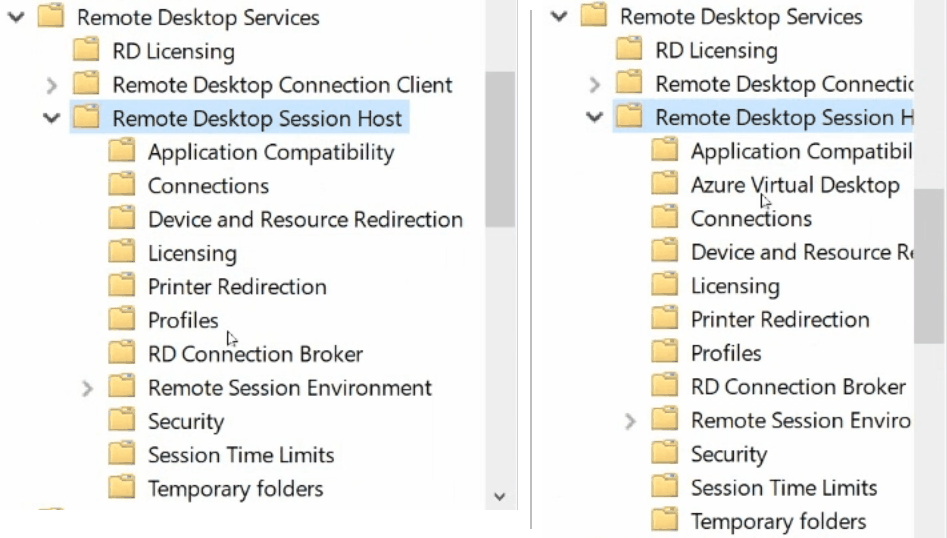
Where the course goes wrong:
- It calls the template files an “HTML file” and an “ADM/XML file”.
They’re the
.adml(language strings) and the.admx(the policy definitions). - It links the GPO to the whole domain, then tests on a Windows 11
client with
gpupdate /forceand gpedit. On a client the policy does nothing. It belongs on the session hosts, so link it to their OU. Clients only need to reach UDP 3390 on the session hosts. - It says to check 3390 isn’t blocked outbound. What has to be opened is inbound on the session hosts.
- With Intune (Entra joined session hosts) the same settings are in the settings catalog. No template to download.
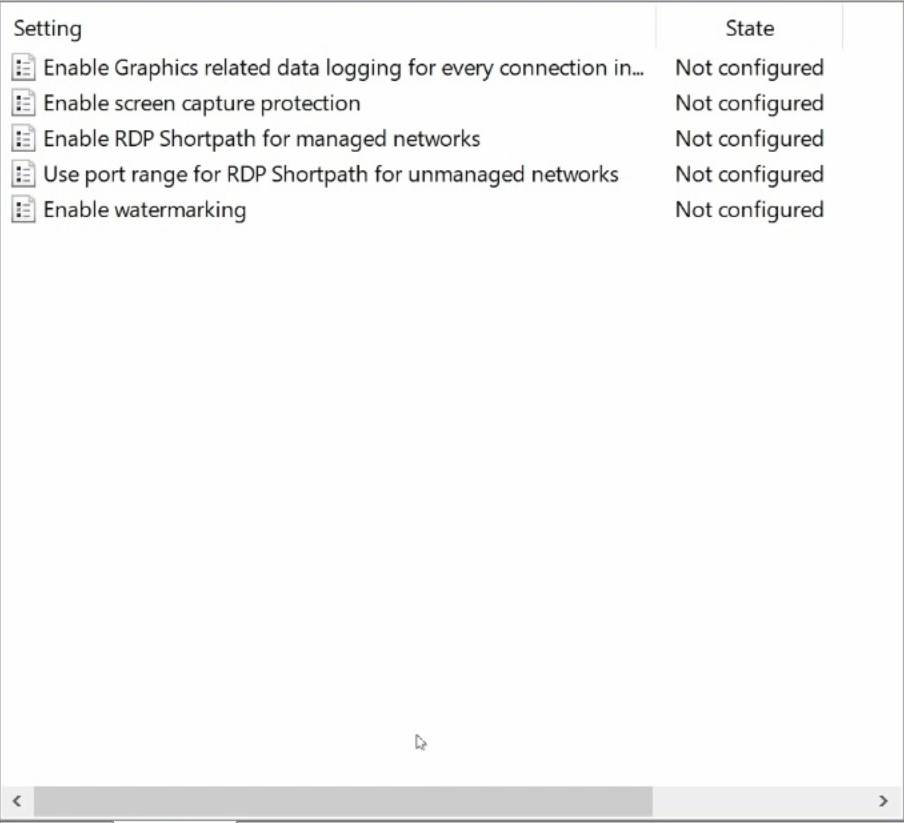
The other settings in that folder: graphics data logging, screen capture protection, watermarking, and Use port range for RDP Shortpath for unmanaged networks, which narrows the dynamic UDP ports the public network types use. Newer versions of the template add an RDP Shortpath subfolder to turn each of the other three types on or off.
QoS (DSCP marking)
QoS only works with RDP Shortpath for managed networks. It isn’t supported on the TCP reverse connect transport, and it only helps where every link between client and session host honors the markings: a managed network, not home internet.
In a GPO for the session hosts: Computer Configuration → Policies → Windows Settings → Policy-based QoS → Create new policy.
| Page | Setting |
|---|---|
| 1 | Name, DSCP value 46, no throttle rate |
| 2 | Only applications with this executable name: svchost.exe |
| 3 | Any source and any destination IP |
| 4 | Protocol UDP, source port 3390, any destination port |
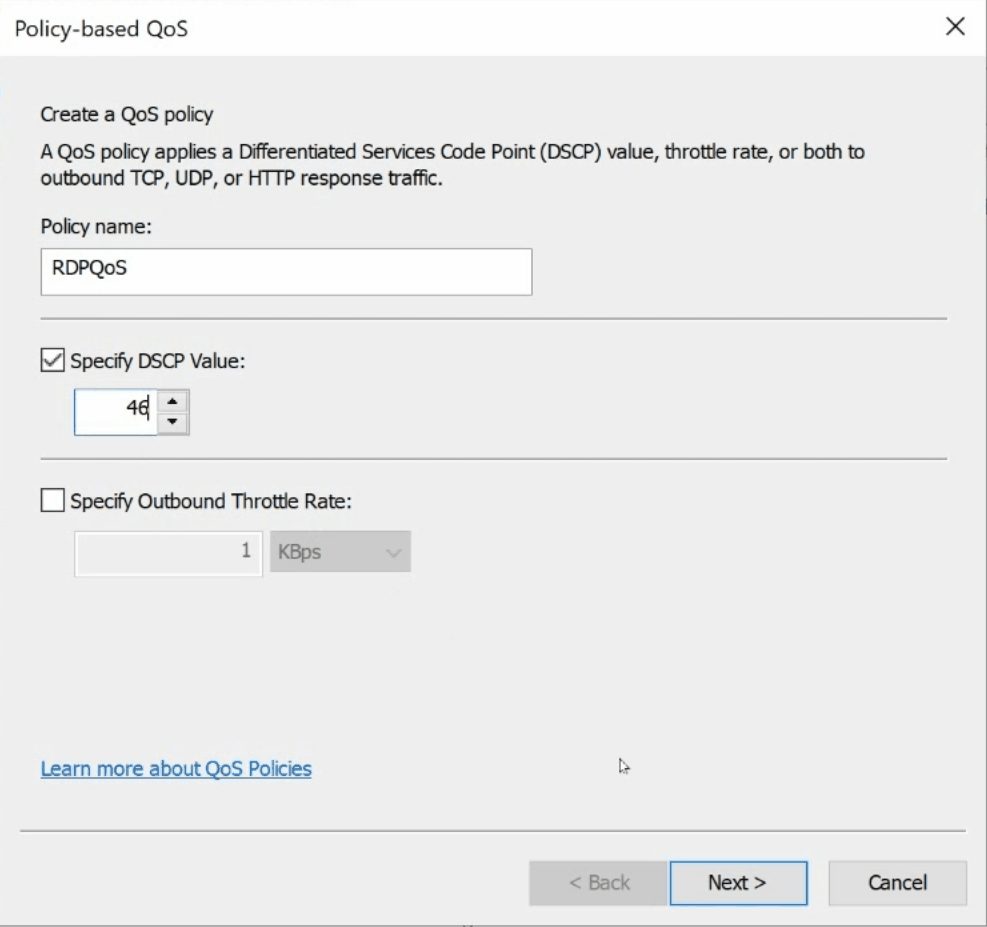
- The course calls it the “DHCP value”. It’s DSCP, Differentiated Services Code Point: a value from 0 to 63 in the IP header that routers use to pick a queue. 46 is EF (Expedited Forwarding), the class used for real-time traffic like voice.
svchost.exebecause the Remote Desktop Services service runs inside it.- The course picks TCP on page 4. Shortpath is UDP, so a TCP policy never matches anything. It has to be UDP:
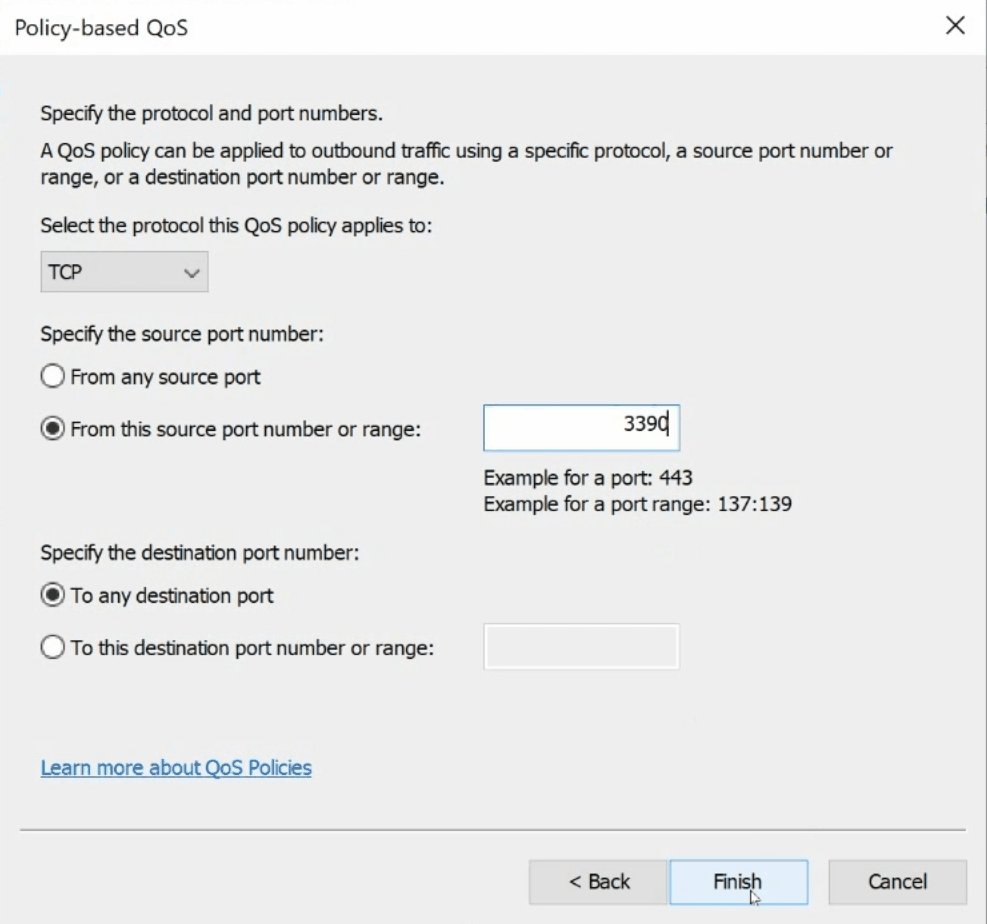
- Source port 3390 matches the session host’s listener, so this marks the session host’s traffic to the client. Routers and switches still need their own QoS config to act on DSCP 46.
The same policy in PowerShell, on a session host:
New-NetQosPolicy -Name "RDP Shortpath for managed networks" `
  -AppPathNameMatchCondition "svchost.exe" -IPProtocolMatchCondition UDP `
  -IPSrcPortStartMatchCondition 3390 -IPSrcPortEndMatchCondition 3390 `
  -DSCPAction 46 -NetworkProfile All
A QoS policy can also carry a throttle rate (capacity post).
Checking it
gpresult /h C:\report.htmlon a session host shows whether the GPO applied. (The course runs it on the client.)- In a session, the connection information in the client shows the transport. UDP means Shortpath is working.
- Group Policy refreshes on its own about every 90 minutes plus a random 0 to 30, which is the course’s “90 to 120 minutes”. The listener still needs the restart.
RDP Multipath
Not in the course, but on the current AZ-140 outline: RDP Multipath keeps backup UDP and TCP paths ready and switches if the active one degrades. Nothing to configure beyond Shortpath.
Quick reference
- Shortpath: direct UDP after the TCP 443 start, falls back to TCP.
- Managed networks listener: a session host policy from the AVD admin template, plus UDP 3390 inbound. The other three types need nothing.
- QoS: Policy-based QoS on the session hosts,
svchost.exe, UDP source port 3390, DSCP 46. Shortpath for managed networks only.
 My Computer


 Getting around


