


Active Directory domain foundations
Foundation material before the AVD specifics. Microsoft administration is mid-transition from on-prem to the cloud, and where it’s going only makes sense next to where it’s been: the traditional on-prem Active Directory domain.
From peer-to-peer to domains
- 1950s-60s: mainframes. Room-sized machines, the early ones built on vacuum tubes.
- 1970s: processing moves onto integrated circuits (chips), opening the door to personal computing.
- 1980s: PCs show up in offices and get networked together, peer-to-peer.
- 1980s-90s: Novell NetWare (from 1983) popularizes servers: file servers first, then a directory to manage users and machines (NDS, 1993). Microsoft’s answer is Windows NT and the domain controller.
- 2000: Microsoft releases Active Directory.
Peer-to-peer is the problem everything after it solves: no centralization. Every computer was equal and none was in charge, so an admin making a change had to sit down at each machine (or talk users through it). Sharing files meant machines sharing with each other and people knowing each other’s passwords. It worked, just not efficiently.
The file server fixed the sharing half: one more powerful machine everybody shares files on. The domain controller fixed the management half: a special type of server that manages the other machines.
Active Directory Domain Services
An AD domain is drawn as a triangle. A domain controller (DC) is a server holding the domain’s database, the Active Directory database, and the whole service is still called AD DS (Active Directory Domain Services) today.
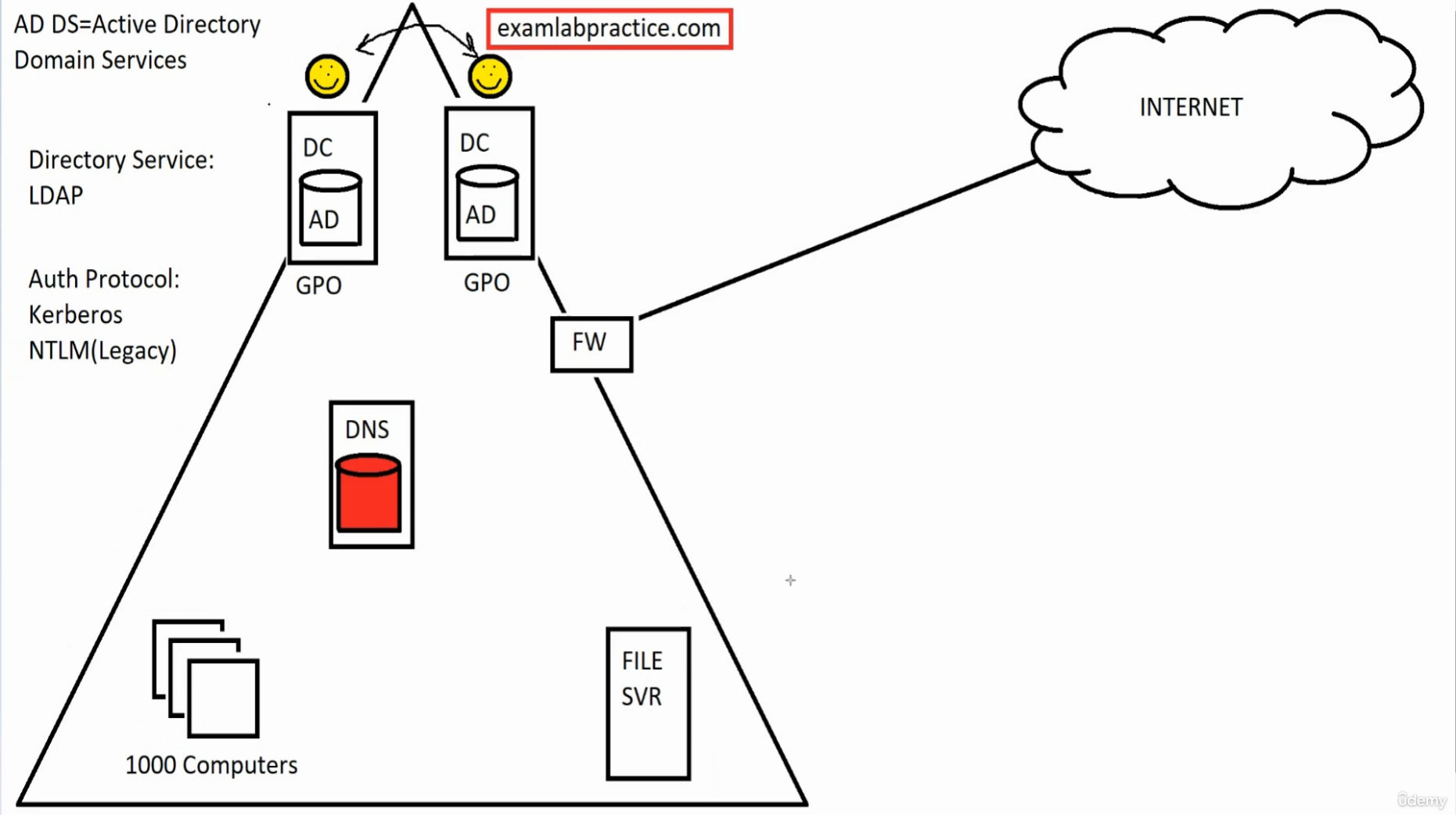
Hearing AD DS generally means an on-prem domain, as opposed to Microsoft Entra ID (formerly Azure AD), the cloud identity service. That distinction is AZ-140 material: the exam has you pick an identity scenario for AVD, and AD DS is one of them, alongside Microsoft Entra ID and Microsoft Entra Domain Services. The trap: that choice is what the session hosts join. Users always sign in to AVD through Entra ID, so with AD DS their accounts have to be synced up to Entra ID (hybrid identities). AD-only accounts don’t work. My AVD lab went cloud-only on Entra ID, with no domain controller at all.
Always run more than one DC, for the same reasons you’d run more than one of any server:
- Load: every machine authenticates against a DC, and a thousand machines shouldn’t all funnel into one.
- Redundancy: with a single DC, losing that server takes authentication down with it.
Replication
DCs replicate: whatever you do on one carries over to the others. Create a user account on the first DC and replication copies it to the second, so that user can log on at any of the thousand machines and authenticate against either DC. Group Policy replicates too, in two parts (more below).
The protocols
A protocol is basically a language both sides agree on. AD speaks three:
- Kerberos: the authentication protocol, and the default.
- NTLM: the older authentication protocol, kept around for legacy, pre-2000 machines. It’s also the fallback when Kerberos can’t be used, and Microsoft has since deprecated it.
- LDAP (Lightweight Directory Access Protocol): the directory service language, how clients query and update the directory.
Both authentication protocols let users prove who they are without sending the password itself across the network.
All of it is decades old: cutting edge when it came out, dated now, but it still works and is still pretty secure (with security caveats the course hasn’t gotten to yet).
DNS
Every machine needs a name tied to an IP address, and the domain needs a name too. Usually that’s the company name, often matching the web presence: the course’s example domain is examlabpractice.com.
A DNS (Domain Name System) server in the domain keeps the names and addresses together in its own database. On the whiteboard it’s color coded red to match the domain name: that database is the zone for examlabpractice.com.
Every machine (clients, DCs, the file server) registers its IP address with DNS. That’s centralized name resolution: any machine looking for another one just queries DNS.
The lookup that matters most is finding a domain controller. A client asks DNS where a DC is, DNS answers (DCs register SRV records for exactly this), and the client goes and authenticates. So AD lives and dies by DNS: a machine pointed at the wrong DNS server can’t find a DC to log on or join the domain. That one comes back in AVD, where session hosts joining an AD DS domain need their virtual network’s DNS pointed at the domain controllers.
Group Policy
A GPO (Group Policy Object) is a bundle of settings that domain machines pick up from the DCs and apply: any attribute you’d want to turn on, turn off, or change, out of thousands available. Typical asks from the boss: force the firewall on everywhere, keep antivirus up to date, stop people setting their own wallpaper. GPOs can even deploy software.
Every DC ends up with the same GPOs, so it doesn’t matter which DC a machine authenticates against. A GPO is two halves that replicate separately: the container in AD (normal AD replication, usually under a minute within a site) and the template files in SYSVOL (DFS Replication, every 15 minutes within a site). Right after an edit, two DCs can briefly disagree.
The internet edge
Bring in an internet connection and a firewall goes between it and the internal network. Traffic flows out; the only traffic coming back in is replies to what went out, plus anything deliberately allowed through.
The traditional domain
All of it adds up to centralization. Under peer-to-peer every machine was its own boss; in a domain, the DCs centralize identity and policy and DNS centralizes name resolution. That’s how it’s been done for 20+ years, and it’s the baseline for what comes next: RAS, VPNs, and virtualization.
 My Computer


 Getting around


