


RAS, DMZ, and virtualization foundations
More foundation, built on top of the traditional domain: how remote users got in, how internet-facing servers got protected, and how virtualization changed the server room. Old ground, but it’s the ground cloud computing grew out of.
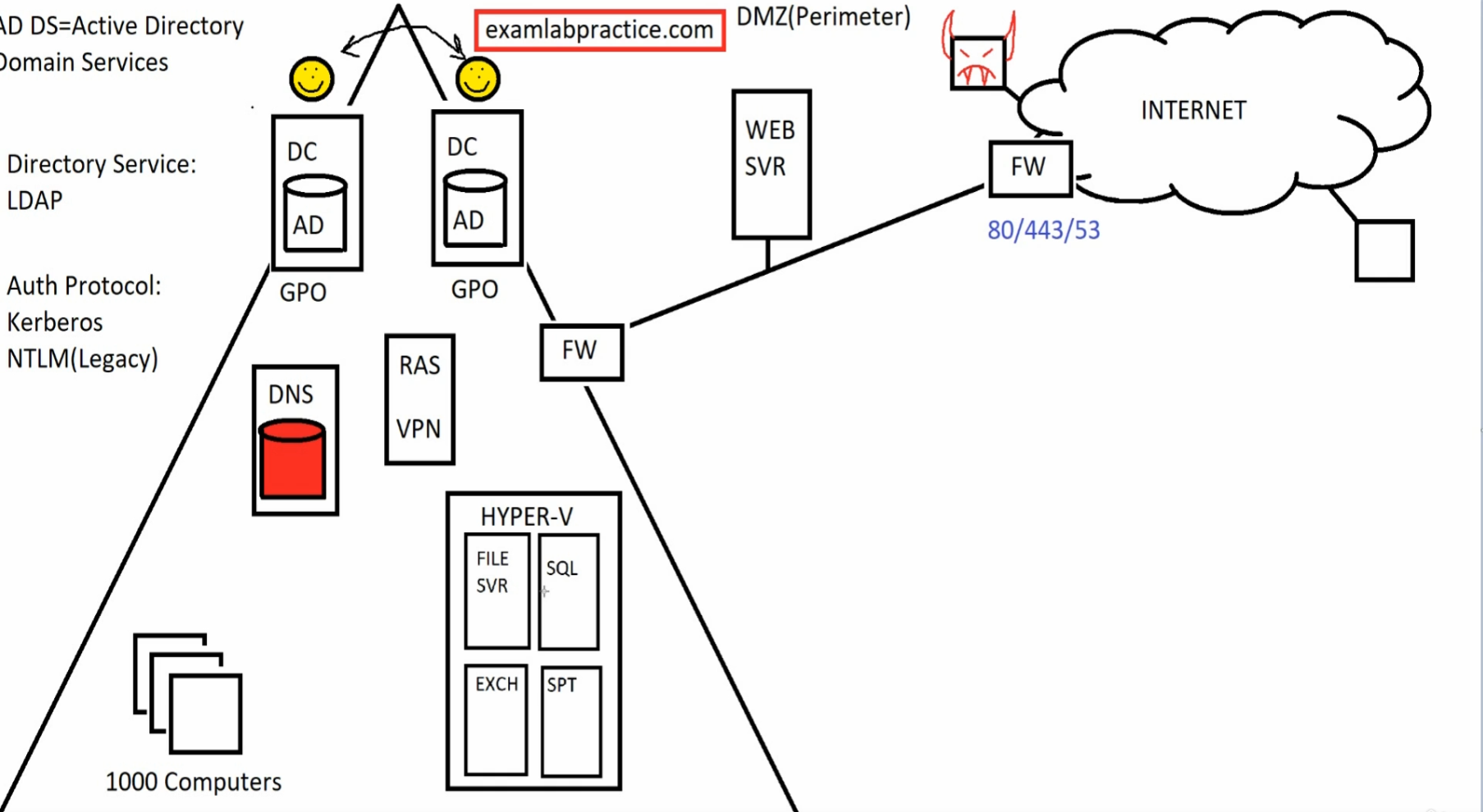
Quick protocol recap: AD DS runs on LDAP, with Kerberos for authentication and NTLM (NT LAN Manager) for the legacy 90s devices. Even Kerberos is old, dating back to the 1980s, but old doesn’t automatically mean insecure: a lot of it has been updated over the years.
The remote user
Scenario one: someone working from home (far more common now than it used to be) who needs the services inside. In the do-it-yourself era that meant self-hosted servers: a file server, a SQL database server, Exchange for email, SharePoint on-prem.
What not to do: open ports on the firewall and let them straight in. Plenty of companies did exactly that in the 90s, some without a real firewall at all, just public addresses reachable from home. Scary then, much scarier now, with attackers after company data, damage, and ransom.
VPNs and RAS
The fix is a VPN (virtual private network): an encrypted tunnel from the remote user into the network. Two ways to terminate it:
- VPN concentrator: a dedicated appliance built to accept secure connections in.
- RAS server: the Microsoft way. A Windows Server running RRAS (Routing and Remote Access Services), which supports VPN.
The tunnel carries everything encrypted to the RAS server, and from there the user reaches internal resources. Anybody watching in the middle can see traffic heading to the firewall, and that’s all: not what it says.
AVD turns this around, which is worth remembering later: session hosts and clients both connect outbound to the AVD service over HTTPS (TCP 443), a reverse connection. The session hosts have no inbound ports open, and users don’t need a VPN to reach their desktop. That’s how every connection starts; RDP then tries to move to UDP (RDP Shortpath). Over the internet that’s still outbound only (UDP 3478 to Microsoft’s STUN/TURN servers), but Shortpath for managed networks (over a VPN or ExpressRoute) has each session host listen on UDP 3390 inbound.
The DMZ
Scenario two: a service that has to face the internet, like the
company hosting its own web server (www.examlabpractice.com) for
anonymous visitors.
Put it inside the domain and you have to open 80 (HTTP) and 443 (HTTPS) inbound to it. Anyone on the internet can reach it, attackers included, and if one compromises the website they can pivot: use the web server as a foothold to reach the other services on the internal network. (A reverse proxy is another way to publish an internal server; that one’s parked for later.)
Put it outside the firewall instead and nothing has to be opened, but the server now sits on the internet with no protection at all.
The answer is a second firewall:
- External firewall: between the internet and the DMZ. Opens only what the public services need: 80 and 443 for the web server, 53 if DNS lives out there too.
- Internal firewall: between the DMZ and the domain. Nothing from the DMZ gets through to internal resources; VPN, behind plenty of authentication, is about the only traffic allowed past it.
The network between them is the DMZ (demilitarized zone), more often called a perimeter network now: same thing. CompTIA’s name is screened subnet, covered in my Network+ notes. So even a hacked web server stays stuck in the DMZ.
Virtualization
The old mindset again: host everything yourself, in your own little datacenter, one physical server per service (file, SQL, Exchange, SharePoint). Redundancy meant clustering, which doubled the count: four services, eight servers.
Virtualization isn’t new. A hypervisor is software that emulates hardware, and whatever runs on hardware can run on the emulated version. The term goes back to the 1970s, and mainframes dividing up processing time for shared computing were already a form of it.
VMware didn’t invent it, and neither did Microsoft, but VMware was the biggest contributor to making it mainstream: credit where it’s due. The pitch was that those four services don’t need four physical servers. One powerful hypervisor host runs them all as virtual machines. Microsoft’s hypervisor is Hyper-V.
What that buys:
- Consolidation: one host instead of a server per service.
- Checkpoints: Microsoft’s name for snapshots (renamed in Windows Server 2012 R2; most other vendors still say snapshots). Take one, make the change, revert if it breaks something.
- Cheap redundancy: a second host holding copies of the VMs. Two servers instead of eight.
Microsoft’s own caveat on checkpoints: a standard checkpoint isn’t a full backup, and it can cause data consistency problems for anything that replicates between nodes, Active Directory included. Production checkpoints, the default now, use VSS to stay data-consistent.
Elasticity
This is where cloud thinking starts. Each VM is given an amount of RAM and processing power, but they all draw on the host’s shared pool. If the file server has RAM it isn’t using and SQL needs more, the file server gives some up, SQL uses it, and SQL releases it back to the pool when it’s done. The VMs grow and shrink as needed.
Hyper-V’s feature for the memory side is Dynamic Memory: startup, minimum, and maximum RAM per VM, with unused memory reclaimed for the others. Microsoft notes the consolidation gains are biggest in VDI.
That’s elasticity on one box. In the cloud, the same idea stretches across many machines in huge datacenters (the AZ-900 definition: automatic scaling up and down). Virtualization is where cloud computing started, and cloud services are the next section.
 My Computer


 Getting around


