


Microsoft cloud foundations: IaaS, PaaS, SaaS
Cloud services came out of virtualization: Amazon, Google, IBM, and Microsoft already had huge datacenters, so they started renting out capacity to customers who’d rather not run it on-prem. The course’s analogy: paying a shop to change the oil instead of doing it yourself.
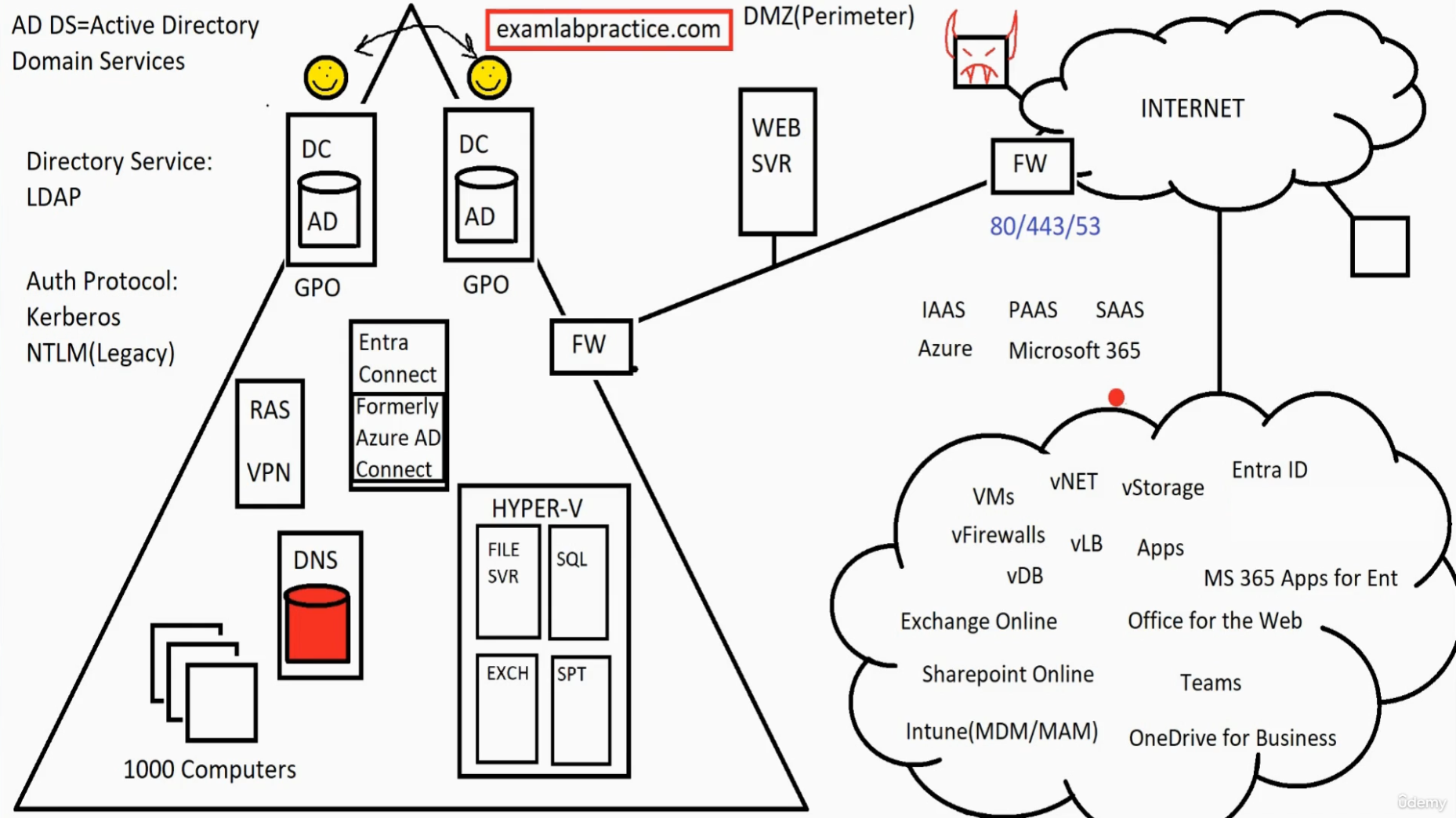
IaaS vs PaaS vs SaaS
| Model | You get | You manage | OS patched by |
|---|---|---|---|
| IaaS | VMs, networks, storage | The OS and up: apps, data | You |
| PaaS | A managed platform for your app or config | The app or config, the data | Microsoft |
| SaaS | A finished app | Users, data, settings | Microsoft |
Microsoft handles the physical side (datacenter, hosts, network) in all three, PaaS adds the OS and runtime, and SaaS adds the app itself. Control and work both drop going down the table.
- IaaS: Azure VMs, virtual networks, disks.
- PaaS: App Service, Functions, Azure SQL Database.
- SaaS: Microsoft 365, Dynamics 365.
The tell: patching the OS means IaaS. Microsoft runs the OS but it’s your app or config on top: PaaS. Just signing users in and using it: SaaS. Data, accounts and identities, and the devices people use are the customer’s job in every model.
The course splits it by admin effort instead: anything that still has to be administered counts as PaaS, the finished user experience as SaaS. So Entra ID (arrives with one admin account, users and groups built out by hand) is PaaS, and each Microsoft 365 service is split: admin side PaaS, user side SaaS. Microsoft’s own model splits on who runs the OS and runtime and calls Microsoft 365 SaaS outright (AZ-900 version). Microsoft’s version is the exam answer.
Azure vs Microsoft 365
| Azure | Microsoft 365 | |
|---|---|---|
| Mostly | IaaS, plus PaaS (and a little SaaS) | SaaS |
| Billing | Pay for what’s used: CPU, RAM, storage, network | Per-user licenses, priced per month on a monthly or annual commitment |
| Directory | Entra ID | Same Entra ID |
The two are tied together through one Entra ID tenant: users created on either side show up on both. Signing up for one creates the tenant and the other attaches to it. That’s how the AVD lab went: Azure free account first, then the M365 trial attached to the same tenant.
Entra ID is the cloud directory: user accounts, passwords, groups, role permissions. AD DS is on-prem, Entra ID is cloud. It was Azure AD until the 2023 rename, and plenty of docs and older course videos still say Azure AD.
Microsoft 365 services
- Microsoft 365 Apps for enterprise: the installed desktop Office apps (Word, Excel, PowerPoint, Outlook). Formerly Office 365 ProPlus.
- Office for the web: browser versions of the Office apps, usable as soon as the user has a license. Newer docs call it Microsoft 365 for the web.
- Exchange Online: email.
- SharePoint Online: team sites and document libraries.
- Teams: chat and meetings.
- Intune: MDM and MAM (mobile device management, mobile application management). The cloud’s replacement for GPOs: settings, policies, app deployment. Manages on-prem machines too.
- OneDrive (formerly OneDrive for Business): per-user cloud file storage.
Hybrid identity
A domain plus the cloud with no sync means two accounts per user: one for on-prem, one for the cloud. The goal is SSO (single sign-on): one account for everything.
- Microsoft Entra Connect (formerly Azure AD Connect): the traditional tool. Runs on a dedicated on-prem server and syncs AD users up to Entra ID. Can be filtered down to only the users that should sync.
- Microsoft Entra Cloud Sync: the lightweight option. A small provisioning agent instead of a dedicated sync server, with the configuration kept in the cloud. Microsoft’s new sync development is focused here.
How the sync behaves:
- Entra Connect syncs users one way, AD up to Entra ID: a user created in the cloud doesn’t come down to AD. Cloud Sync is closing that gap: cloud users down to AD is in preview, cloud security groups down to AD is GA.
- Password writeback (optional, goes with self-service password reset, needs Entra ID P1/P2 or Microsoft 365 Business Premium): a password changed or reset in the cloud gets written back to AD.
- Seamless SSO (optional, with password hash sync or pass-through auth): signing in to the domain on a corporate machine signs in to the cloud too. For Windows 10/11 Microsoft recommends hybrid join instead, which does the same through the sign-in token (PRT); Seamless SSO is for older Windows.
Where it’s heading
- Microsoft is moving away from domains. The instructor (20+ years implementing AD as a consultant) no longer recommends building a domain for a new company; cloud-only usually comes out cheaper.
- An existing domain goes hybrid: keep it and sync up with Entra Connect or Cloud Sync.
- Intune manages machines with no domain involved, and the clients themselves can live in the cloud (AVD, Windows 365).
 My Computer


 Getting around


