


Azure virtual network and subnet creation
Building the lab networks from the VNet concepts note: four VNets in one resource group, VNet1 as the future hub. No VMs in them yet and nothing peered.
The lab layout
East US, resource group vNetDemoRG:
| VNet | Address space | Subnets |
|---|---|---|
| VNet1 (hub) | 10.1.0.0/16 | Subnet1A 10.1.1.0/24, Subnet1B 10.1.2.0/24 |
| VNet2 | 10.2.0.0/16 | Subnet2A 10.2.1.0/24, Subnet2B 10.2.2.0/24 |
| VNet3 | 10.3.0.0/16 | Subnet3A 10.3.1.0/24 |
| VNet4 | 10.4.0.0/16 | Subnet4A 10.4.1.0/24 |
- Each VNet also kept the portal’s
defaultsubnet at 10.x.0.0/24. - No overlap with each other or with the DC’s
avd-vnet(172.16.x), so any of them can be peered later. - Each /24 shows as 251 usable + 5 Azure reserved (which 5).
Creating a VNet in the portal
Resource group first (Resource groups → + Create), or Create
new on the VNet’s Basics tab. No spaces in resource group names
(letters, digits, -, _, ., parentheses), hence vNetDemoRG.
Start from Virtual networks → + Create, or from the resource group’s + Create, which opens the Marketplace:
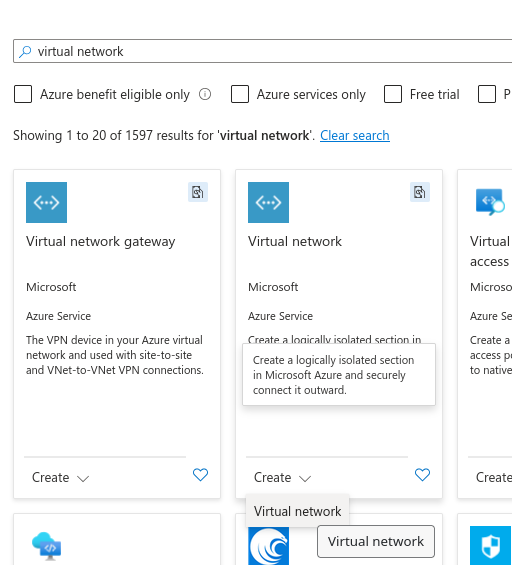
Pick Virtual network. Virtual network gateway next to it is the VPN/ExpressRoute gateway, a different resource that bills by the hour.
The tabs:
- Basics: subscription, resource group, name
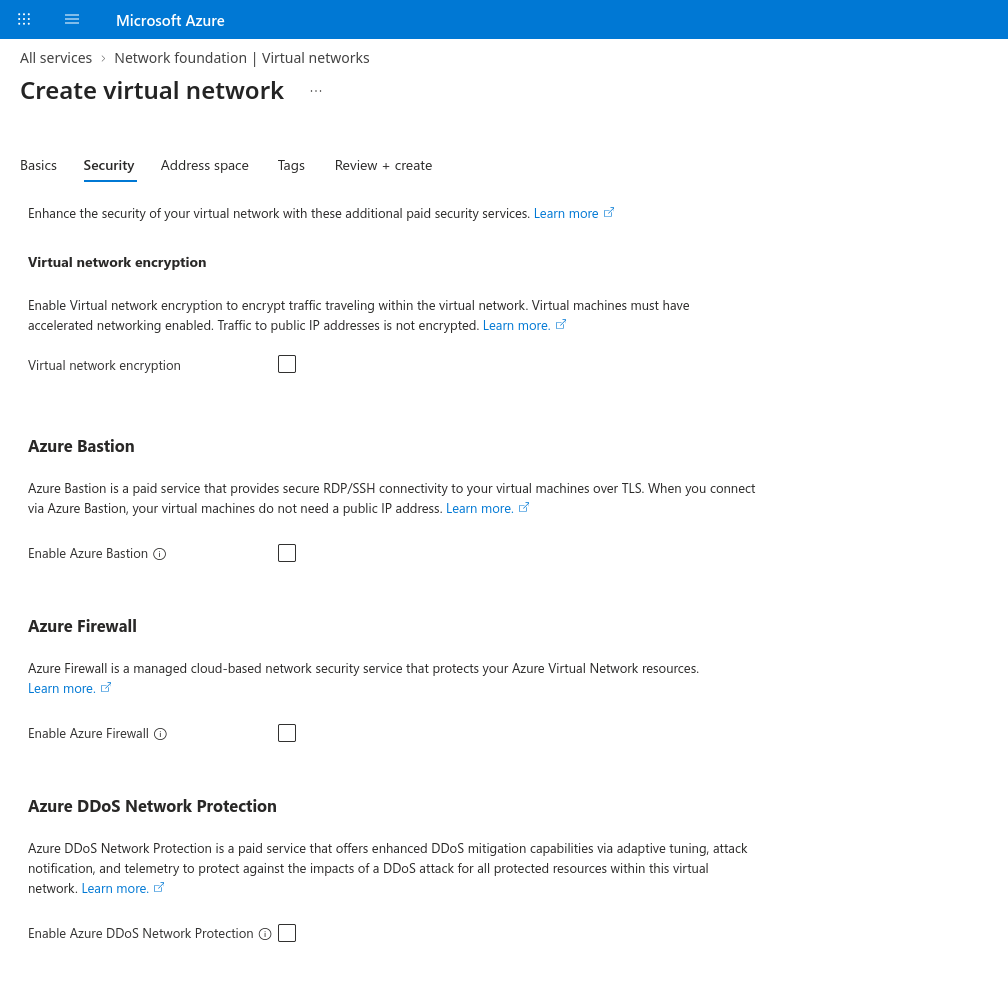
VNet1, region East US. A VNet lives in one region, and VMs on it have to be in that region too. - Security: virtual network encryption, Bastion, Azure Firewall, DDoS Network Protection. All left off (costs below).
- Address space: it starts as
10.0.0.0/16with adefaultsubnet. Change the starting address to10.1.0.0(still /16) and the default subnet follows to 10.1.0.0/24. Then + Add a subnet: nameSubnet1A, starting address10.1.1.0, size /24. - Tags: optional.
- Review + create, then Create once validation passes.
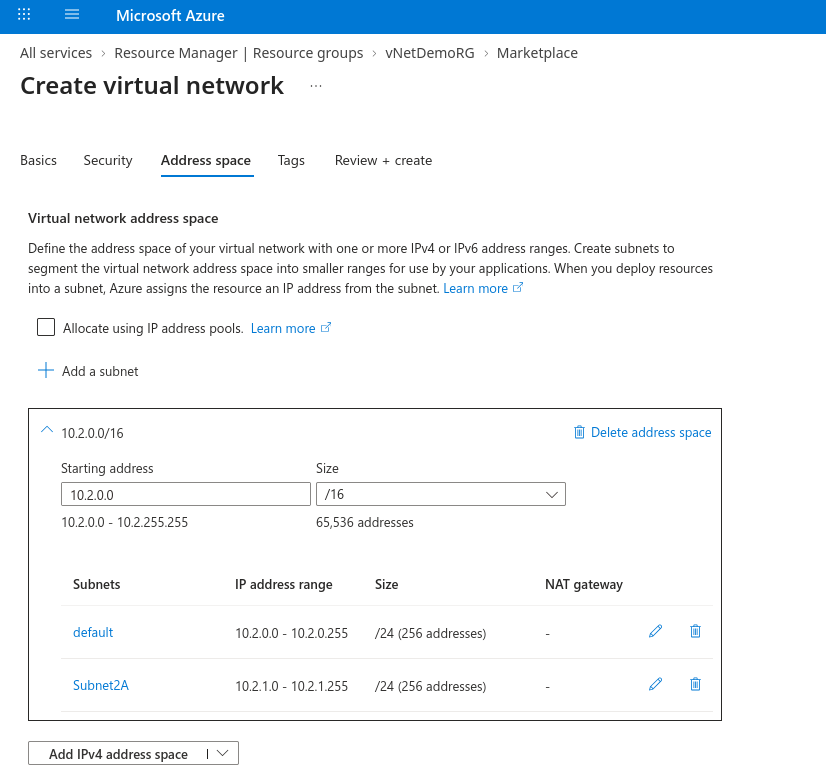
The video does the subnet step (called IP addresses then) before Security. The portal now goes Basics, Security, Address space, Tags, Review + create.
The subnet pane
+ Add a subnet, or editing one, opens this. What the course skips (“not getting into NAT gateway and service endpoints”):
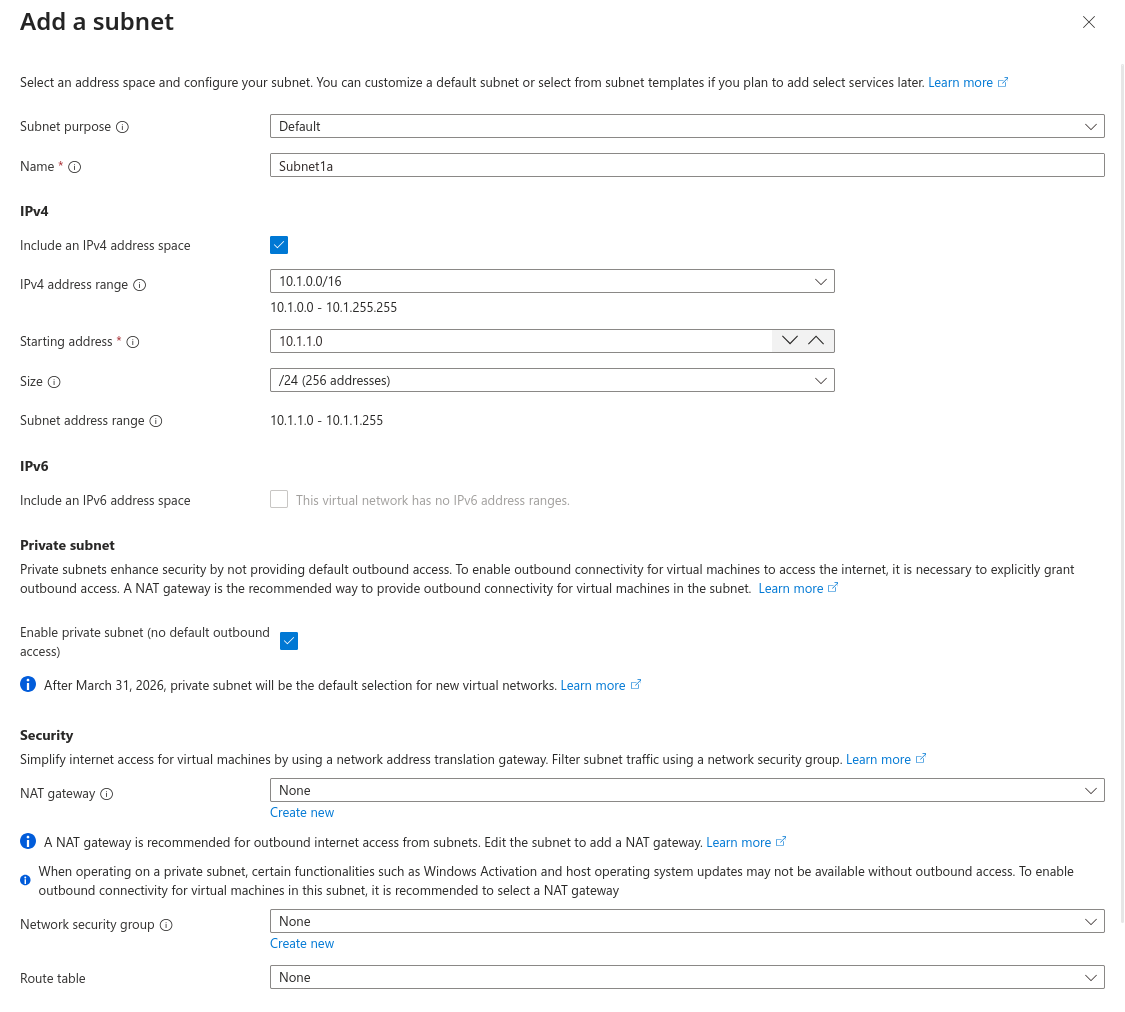
| Setting | For |
|---|---|
| Subnet purpose | Presets for Bastion, Firewall, and gateway subnets: fills in the required name and size |
| Private subnet | No default outbound internet. On by default in the portal |
| NAT gateway | Explicit outbound internet for a private subnet |
| Network security group | Filter rules for the whole subnet |
| Route table | UDRs, e.g. send traffic to a firewall |
| Service endpoints | Reach Storage, SQL, etc. over the Azure backbone |
| Subnet delegation | Lets a PaaS service deploy its own resources into the subnet |
Private subnet is the one to remember. With no VMs it doesn’t matter yet, but VMs in a private subnet get no internet (no Windows Update, no activation, can’t reach the AVD service) until there’s an explicit way out: a NAT gateway on the subnet, a public IP on the VM, load balancer outbound rules, or a UDR through a firewall. More in the concepts note.
Adding a subnet to an existing VNet
VNet → Subnets → + Subnet → name, starting address, size → Save.
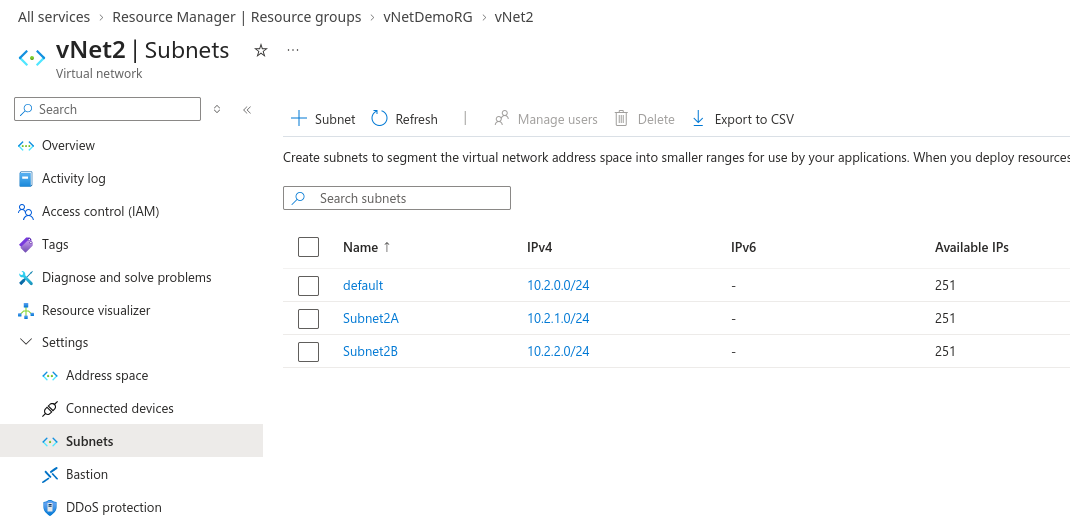
- VNet1 got
Subnet1B10.1.2.0/24. - VNet2 got
Subnet2B10.2.2.0/24, the next /24 after Subnet2A. - The range has to be inside the VNet’s address space and can’t overlap another subnet.
- A subnet’s range can only be changed, and the subnet deleted, while nothing is deployed in it.
Security tab: Bastion, Firewall, DDoS
The course mentions these and moves on. The paid ones bill from the moment they’re deployed, used or not (East US list prices, Nov 2026):
| Option | What it is | Per month |
|---|---|---|
| Azure Bastion | RDP/SSH to VMs from the portal, no public IP on the VM | Basic about $139, Standard about $212 |
| Azure Firewall | Managed stateful firewall | Basic about $288, Standard about $913, plus per GB |
| DDoS Network Protection | DDoS mitigation tuned to your traffic, with alerts and reports | About $2,944 per plan |
- Virtual network encryption (top of the tab) encrypts traffic between VMs inside the VNet. The VMs need accelerated networking, and traffic to public IPs isn’t covered.
- Bastion: ticking it here adds an
AzureBastionSubnet(/26 or larger) and a public IP for a dedicated Bastion host. The free Developer tier uses shared infrastructure instead: no subnet, no public IP, one VM at a time, and no reaching VMs in peered VNets. It isn’t offered in East US (it is in East US 2, Central US, and West US). Otherwise Basic is $0.19/hour: deploy it when it’s needed and delete it after. Exam tie: AZ-140 lists Bastion or just-in-time VM access for admin access to session hosts. - Azure Firewall needs its own
AzureFirewallSubnet(/26). The Basic tier also needs anAzureFirewallManagementSubnet(/26) and a second public IP for management. In hub-spoke it goes in the hub, VNet1 here. - DDoS: every public IP already gets basic DDoS protection for free (infrastructure protection). The course’s “DDoS standard” is the old name of DDoS Network Protection, one of two paid tiers. Its monthly fee includes 100 public IPs across the tenant; more cost extra per IP. The other tier, DDoS IP Protection, is $199/month per IP, so under 15 IPs it’s cheaper (it lacks rapid response support and cost protection).
- Turning DDoS protection off on a VNet doesn’t stop the bill. Delete the plan.
- VNets and subnets themselves are free. The cost is in what goes in them.
Same thing in PowerShell
New-AzResourceGroup -Name vNetDemoRG -Location eastus

# New VNet with its first subnet
$sub = New-AzVirtualNetworkSubnetConfig -Name Subnet1A `
  -AddressPrefix 10.1.1.0/24
New-AzVirtualNetwork -Name VNet1 -ResourceGroupName vNetDemoRG `
  -Location eastus -AddressPrefix 10.1.0.0/16 -Subnet $sub

# Add a subnet to an existing VNet
$vnet = Get-AzVirtualNetwork -Name VNet2 -ResourceGroupName vNetDemoRG
Add-AzVirtualNetworkSubnetConfig -Name Subnet2B -VirtualNetwork $vnet `
  -AddressPrefix 10.2.2.0/24
$vnet | Set-AzVirtualNetworkNew-AzVirtualNetworkSubnetConfigonly builds a subnet object in memory.New-AzVirtualNetworkcreates the VNet with it.- Same when adding:
Add-AzVirtualNetworkSubnetConfigonly changes the local$vnetcopy. Nothing changes in Azure untilSet-AzVirtualNetwork. Easy to forget. - Both subnet cmdlets take
-DefaultOutboundAccess $false(private) or$true. Worth setting: without it, whether the subnet comes out private depends on the API version the module uses. - Names aren’t case-sensitive, so
VNet2finds the portal’svNet2.
Checking it
- A new VNet can take a minute to show up in the resource group. Refresh.
- Subnets in the same VNet route to each other right away (Subnet1A and Subnet1B). Separate VNets can’t reach each other at all until they’re peered.
- The video says 1A, 2A, and 1B can all talk to each other. Not 2A: it’s in VNet2, so it needs VNet1 and VNet2 peered first.
 My Computer


 Getting around


