


Concepts of using virtual networks and subnets in Azure
Azure networking is regular IPv4 networking, run in software. Same address spaces, subnets, masks, and routing as on-prem. VMs attach with a vNIC (virtual network interface card), and the VNet hands out addresses from its subnets.
VNet and subnets
- VNet: the network as a whole, defined by its address space,
e.g.
10.1.0.0/16(65,536 addresses). - Subnets: slices of that space, e.g.
10.1.1.0/24,10.1.2.0/24,10.1.3.0/24. /24 is the usual rule of thumb. - Separate subnets so each one can get its own security rules.
- All subnets in a VNet route to each other automatically (system routes). Nothing to set up.
Azure keeps 5 addresses per subnet, not 2
The course subtracts the network and broadcast addresses, “plus a couple Azure reserves”. The full list:
| Address | Used for |
|---|---|
.0 |
Network address |
.1 |
Default gateway |
.2, .3 |
Azure DNS mapping |
Last (.255 in a /24) |
Broadcast |
So a /24 has 251 usable addresses, .4 to .254. The first VM in
a subnet gets .4 (the lab DC came out as 172.16.0.4). Smallest
subnet is a /29: 8 minus 5 = 3 usable.
Addressing
- Azure hands out addresses from the subnet over DHCP. Default is dynamic; set static on the NIC in Azure when it has to stay put, like a domain controller.
- Plan so ranges never overlap with on-prem or with any VNet that
will be peered. Overlap breaks routing once they’re connected, and
re-addressing later is painful. The course uses
10.xin Azure because many offices run192.168.xor172.16.xinternally. - Don’t use
127.0.0.0/8,169.254.0.0/16,168.63.129.16, or multicast ranges.
Inbound and outbound
- Inbound from the internet: nothing gets in without a public IP (PIP) on a NIC, load balancer, or firewall.
- Outbound: the course says VMs can reach the internet by default. That’s changing. Microsoft is retiring “default outbound access”: new VNets created with API versions after March 31, 2026 (and the portal already) get private subnets, with no internet access until an explicit method is added (NAT Gateway, a public IP, outbound rules on a load balancer, or a UDR sending traffic through a firewall). Existing VNets keep working. AVD session hosts need outbound access to the AVD service (below), so a private subnet needs one of those.
NSGs (network security groups)
- IP/port filtering rules: allow or deny by source, destination, port, and protocol, processed in priority order (lowest number first).
- Attach to a subnet (covers everything in it) or a NIC (one VM). Both can apply; traffic has to pass both.
- Stateful: allowing a request in also allows the reply out.
- Default rules (can’t be deleted, only overridden by a lower
priority number): inbound allows
VirtualNetworkand Azure Load Balancer probes and denies the rest; outbound allowsVirtualNetworkand the internet and denies the rest. - The
VirtualNetworktag isn’t just this VNet. It includes peered VNets and on-prem networks connected through a gateway, so their traffic is allowed in by default. - Not a full firewall: no deep inspection. That’s Azure Firewall.
Multiple VNets: peering and hub-spoke
Separate VNets (10.1.0.0/16, 10.2.0.0/16, 10.3.0.0/16…) don’t
route to each other at all until they’re peered.
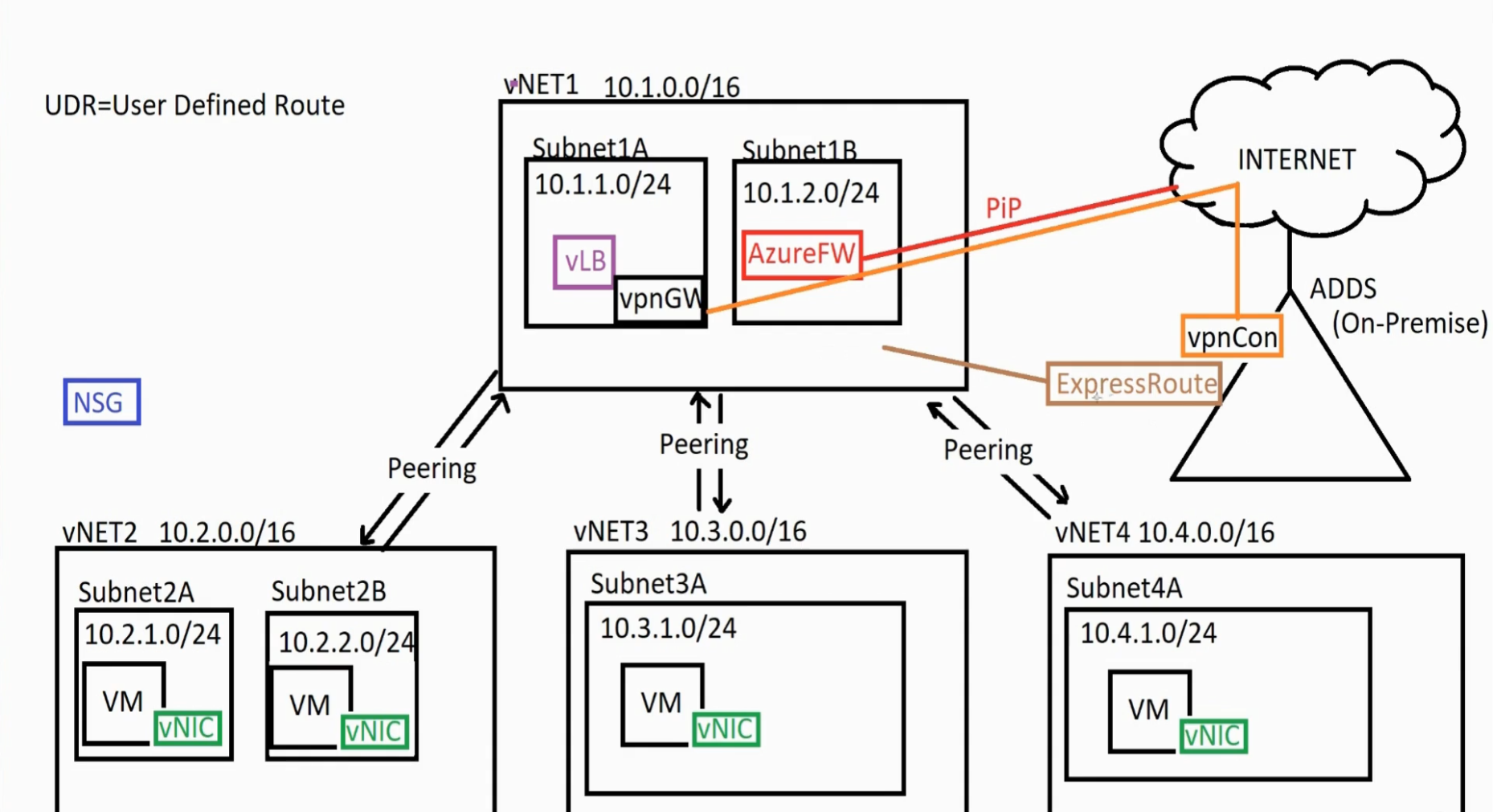
The course’s whiteboard. In a real build the VPN gateway and firewall
don’t share subnets with other things: they get their own
GatewaySubnet and AzureFirewallSubnet (below).
- A peering is two links, one from each side (VNet1 → VNet2 and VNet2 → VNet1). Each direction can allow or block traffic.
- Works across regions (global peering) and across subscriptions.
- Not transitive: VNet2 peered to VNet1, and VNet3 peered to VNet1, doesn’t let VNet2 reach VNet3.
Hub and spoke: one hub VNet with the shared stuff (Azure Firewall, VPN gateway, often the DCs), and spoke VNets per project or workload, each peered only to the hub.
- Spoke-to-spoke goes through the hub because of the non-transitive rule: a UDR (user-defined route) on each spoke subnet sends traffic to the Azure Firewall’s private IP as the next hop, and the firewall decides what’s allowed. The peerings also need allow forwarded traffic turned on, since that traffic didn’t start in the hub.
- The same UDR trick (
0.0.0.0/0→ firewall) forces internet-bound traffic through the firewall too. - Azure Firewall needs its own subnet named
AzureFirewallSubnet(/26). - Load balancer: spreads traffic across several VMs, e.g. three web servers.
Connecting on-prem
| VPN gateway | ExpressRoute | |
|---|---|---|
| Path | Encrypted IPsec tunnel over the internet | Private circuit through a telecom provider |
| On-prem side | VPN device (course: VPN concentrator) | Your edge routers running BGP with Microsoft (the provider’s, with a managed IPVPN) |
| Speed | Limited by gateway size and internet link | 50 Mbps to 10 Gbps circuits |
| Cost | Lower | Higher |
- The VPN gateway lives in a subnet named
GatewaySubnet, /27 or larger (only the Basic SKU can go smaller). Site-to-site connects an office; point-to-site connects one computer. - The course’s “10 to 100 Gbps” is ExpressRoute Direct: dual 10, 100, or 400 Gbps ports straight into Microsoft’s network.
- ExpressRoute is private but not encrypted by default.
Where AVD fits
Session hosts are VMs in a subnet. What they need from the network:
- A DC, when they’re joined to AD DS like this lab (VNet DNS servers pointed at it, as in the AD DS note). Entra-joined session hosts don’t need one.
- Outbound only, no inbound ports. Mostly 443 (the AVD service,
Entra sign-in), plus 80 for certificate checks, 1688 to
azkms.core.windows.netfor Windows activation, and UDP 3478 for relayed RDP Shortpath. - Direct access to
169.254.169.254and168.63.129.16(Azure’s metadata and platform addresses). Don’t proxy or redirect them. - In hub-spoke they sit in a spoke, with the DCs and firewall in the hub. The firewall has to allow all of the above.
 My Computer


 Getting around


