


Azure Firewall Manager
Firewall Manager is one place to see and manage every Azure Firewall and firewall policy across regions and subscriptions, plus the VNets they protect and the DDoS and WAF policies around them. It’s a management view, not a resource you deploy. With one firewall in the lab it’s mostly a viewer.
Finding it
The video searches All services for Firewall Manager. That
doesn’t turn it up anymore: searching fire shows Firewalls and WAF
policies, no Firewall Manager. It’s a section of the Network
security hub now. Search Network security, or All services →
Network security.
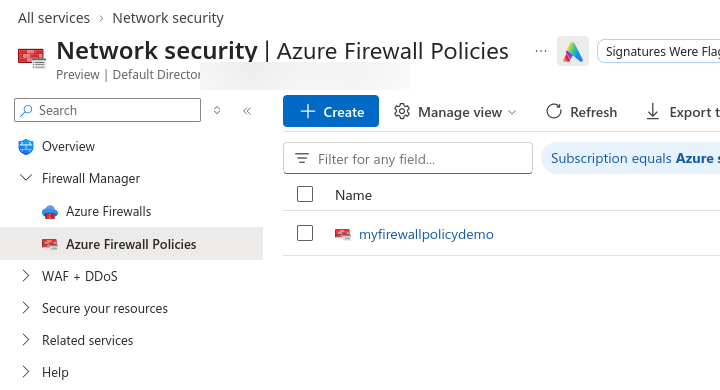
Where the video’s pages are now:
| In the video | Now under |
|---|---|
| Azure Firewall policies | Firewall Manager → Azure Firewall Policies |
| Virtual networks | Secure your resources → Virtual Networks |
| Application delivery platforms | Secure your resources → Application Delivery Platforms |
| DDoS protection plans | WAF + DDoS → DDoS Protection |
| WAF policies | WAF + DDoS → Web Application Firewalls |
What the video shows
- Virtual Networks: every VNet and whether a firewall protects it. VNet1 shows the firewall; vNet2 to vNet4 show none, even though the instructor’s route table already sends their traffic to it. That’s expected: the firewall lives in VNet1, and this page doesn’t show routing.
- DDoS coverage means a VNet linked to a DDoS protection plan. The video’s remark about default DDoS coverage from “a standard plan” doesn’t match anything here. The lab has no plan, only the free basic protection (DDoS costs).
Hub virtual network vs secured virtual hub
Firewall Manager works with two kinds of hub:
| Hub VNet | Secured virtual hub | |
|---|---|---|
| Built on | A normal VNet you manage | A Virtual WAN hub Microsoft manages |
| Spokes connect by | VNet peering | Hub virtual network connections |
| Traffic to the firewall | Your own UDRs | Automatic (BGP) |
| Third-party SECaaS | Set up yourself | Built in |
- The lab’s VNet1 is a hub virtual network: a VNet with a firewall policy attached. It counts even before any spokes are peered.
- Virtual WAN is Microsoft’s managed hub and spoke for connecting lots of sites (branches over VPN or SD-WAN, ExpressRoute, remote users) through Azure. Not covered in the course.
- The hub VNet is the do-it-yourself version: peerings and UDRs by hand, which is what this lab does (route table post).
Security partner providers
Third-party security as a service (SECaaS) for internet-bound traffic, next to Azure Firewall for private traffic.
- Secured virtual hubs only, not hub VNets.
- The course names Check Point and iboss. The docs now list Zscaler as the only supported partner.
DDoS and WAF
- Link VNets to a DDoS protection plan from here. Hub VNets only: DDoS plans don’t cover Virtual WAN hubs.
- Create WAF policies and attach them to Application Gateway or Front Door. WAF does the inbound layer 7 filtering that firewall application rules don’t.
Cost
No charge for Firewall Manager itself. What does cost (East US list):
- A firewall policy attached to more than one firewall: $100 a month per region. With one firewall it’s free.
- The firewalls, secured hubs, DDoS plans, and WAFs bill as usual.
 My Computer


 Getting around


