


Using a route table to direct traffic to the Azure Firewall
Azure routes traffic between subnets, peered VNets, on-prem, and the internet on its own with system routes. A firewall in the hub sees none of it until something sends traffic there. That’s a route table: user-defined routes (UDRs), associated with subnets.
Create the route table
Resource group → + Create → search route table → Route
table → Create:
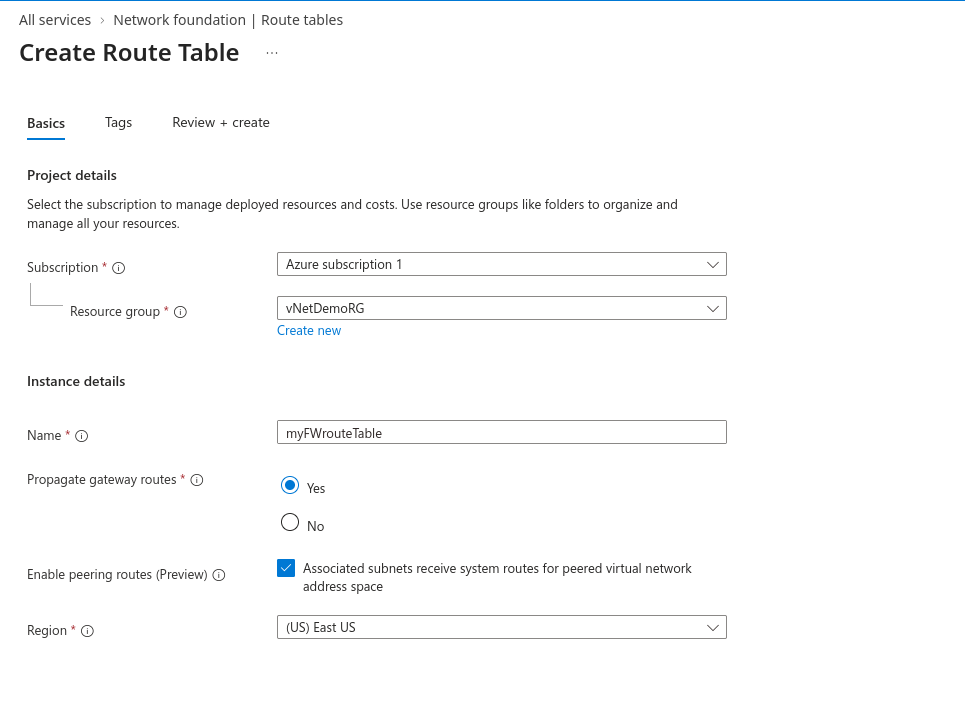
- Region has to match the VNets. A route table only associates with subnets in the same region and subscription.
- Propagate gateway routes: whether routes learned from on-prem
through a VPN or ExpressRoute gateway (BGP) reach these subnets.
The course picks Yes. There’s no gateway in the lab, so it changes
nothing yet. In a real hub and spoke with a firewall, Microsoft’s
tutorials set it to No on spoke route tables: the on-prem routes
are more specific than a
0.0.0.0/0to the firewall, so spoke traffic to on-prem would go around the firewall. - Enable peering routes (Preview): not in the video. Ticked, the default, keeps the normal peering routes. Unticked, subnets using this table lose them, so traffic to a peered VNet follows the UDRs instead (why that matters). Left ticked.
- Route tables sit under Network foundation in the portal now (the breadcrumb).
Add the route
Route table → Routes → + Add:
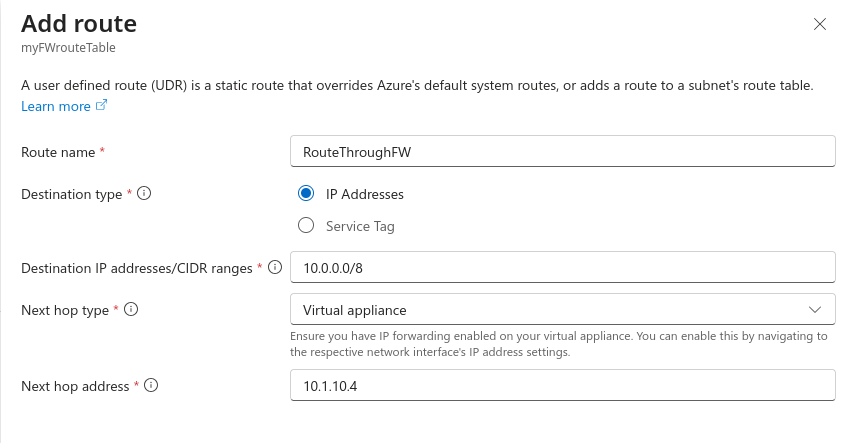
RouteThroughFW: 10.0.0.0/8 → Virtual appliance 10.1.10.4.
- 10.0.0.0/8 covers every 10.x address, so all four lab VNets.
- Next hop address is the firewall’s private IP, from its
Overview page. Here it’s 10.1.10.4, the first usable address in
AzureFirewallSubnet. Private, because this is traffic inside Azure. - The IP forwarding note is for appliances running on VMs (it’s a setting on the VM’s NIC). Azure Firewall handles that itself.
- Destination type can also be a Service Tag, like the AVD route at the end.
Next hop types:
| Next hop | Sends traffic to |
|---|---|
| Virtual appliance | An IP: a firewall or other NVA |
| Virtual network gateway | The VPN gateway |
| Virtual network | Normal routing inside the VNet |
| Internet | Straight out to the internet |
| None | Nowhere (dropped) |
Associate the subnets
Route table → Subnets → + Associate, one subnet at a time:
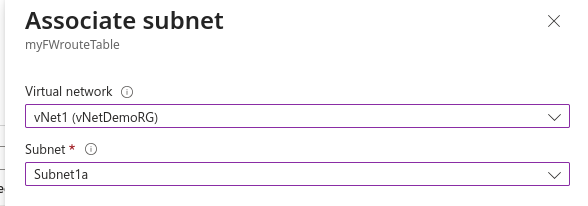
Subnet1A and Subnet1B (vNet1), Subnet2A and Subnet2B (vNet2), Subnet3A (vNet3), Subnet4A (vNet4).
- A route table can serve many subnets; a subnet has at most one. They attach to subnets, never to a whole VNet.
- The
defaultsubnets weren’t associated, so they keep normal routing. - Leave
AzureFirewallSubnetout. The firewall needs direct internet access and doesn’t take UDRs like these. - Route tables are free.
What actually goes through the firewall
The course wraps up with “all communication through these subnets are going to have to go through our Azure Firewall.” Not quite. Azure picks the most specific matching route (longest prefix match). Only on a tie does a UDR beat a system route.
| Traffic | Route that wins | Firewall? |
|---|---|---|
| Subnet2A to Subnet2B | 10.2.0.0/16, vNet2’s own | No |
| vNet2 to vNet1, once peered | 10.1.0.0/16, the peering | No |
| vNet2 to vNet3, both peered to the hub | 10.0.0.0/8, the UDR | Yes |
| vNet2 to the internet | 0.0.0.0/0, system | No |
So once the peerings exist, the 10/8 route does one job: spoke to spoke through the hub firewall. That’s the classic reason for it, since peering isn’t transitive and spokes can’t reach each other otherwise.
- Spoke to hub through the firewall too: add the hub subnet’s prefix (e.g. 10.1.1.0/24) as a UDR, and the spoke’s prefix on the hub side. Longer than the peering’s /16, so it wins. (Or untick Enable peering routes.)
- Internet through the firewall: add
0.0.0.0/0→ firewall. That’s the usual AVD setup, and it’s also an explicit way out for private subnets (the firewall SNATs to its public IP).
Not working yet
- No peerings. vNet2 to vNet4 can’t reach 10.1.10.4 in vNet1 until they’re peered with it, so for now the route has nowhere to send their traffic.
- Default deny. Once traffic reaches the firewall it needs a rule. The only network rule allows TCP 443 to 10.2.1.20, so any other spoke-to-spoke traffic gets dropped.
- The spoke side of each peering needs Allow forwarded traffic, since traffic the firewall forwards into a spoke didn’t start in the hub (peering notes).
- To see which route wins once there are VMs: the VM’s NIC →
Effective routes, or
Get-AzEffectiveRouteTable.
Same thing in PowerShell
$rg = "vNetDemoRG"
$fw = Get-AzFirewall -Name myfirewalldemo -ResourceGroupName $rg
$fwIp = $fw.IpConfigurations[0].PrivateIPAddress

$rt = New-AzRouteTable -Name myFWrouteTable -ResourceGroupName $rg `
  -Location eastus
Add-AzRouteConfig -RouteTable $rt -Name RouteThroughFW `
  -AddressPrefix 10.0.0.0/8 -NextHopType VirtualAppliance `
  -NextHopIpAddress $fwIp | Set-AzRouteTable

# Associate it with a subnet (repeat per subnet)
$vnet = Get-AzVirtualNetwork -Name vNet2 -ResourceGroupName $rg
$sub = $vnet.Subnets | Where-Object Name -eq Subnet2A
$sub.RouteTable = $rt
$vnet | Set-AzVirtualNetwork-DisableBgpRoutePropagationonNew-AzRouteTableis Propagate gateway routes: No.- Same pattern as subnets:
Add-AzRouteConfigand the$subchange only touch the local copy. Nothing changes in Azure until theSet-cmdlet runs.
For AVD
Session host subnets usually get 0.0.0.0/0 → firewall, plus one more
route: destination type Service Tag, WindowsVirtualDesktop, next
hop Internet. That keeps traffic to the AVD gateway and broker off
the firewall, so sessions don’t drop when the firewall scales in
(firewall post).
 My Computer


 Getting around


