


Windows 365 vs Azure Virtual Desktop
Two ways Microsoft streams a Windows desktop from the cloud. Both need an internet connection, and they share plumbing: Windows 365 uses AVD’s gateway and broker for its connections. Users reach either one with Windows App or a browser.
The short version
| Windows 365 | Azure Virtual Desktop | |
|---|---|---|
| What it is | A Cloud PC per user, sold as SaaS | Session hosts you build in Azure |
| VMs live in | Microsoft’s subscription | Yours |
| Users per VM | One at a time | One (personal) or many at once (pooled) |
| Cost | Fixed per user per month, by size | Azure resources as used, plus a license per user |
| Managed in | Intune (Business: Microsoft 365 admin center) | Azure portal |
| Windows | 11 or 10 Enterprise | Also multi-session and Windows Server |
| Single apps | Cloud Apps (Flex shared mode) | RemoteApp |
Windows 365
Microsoft builds and hosts a Cloud PC for each user. Assign a license and the Cloud PC provisions itself; admins don’t create them by hand.
- Sold to organizations only. The course pitches it like something a graphic artist buys for themselves. Windows 365 isn’t available to individuals.
- The thin client idea is right, and Microsoft makes one now: Windows 365 Link, a small device built only to connect to a Cloud PC (select markets).
- Big sizes exist: up to 32 vCPU, plus GPU Cloud PCs (GPU Select, Standard, Super, Max, NVIDIA) for design, rendering, and 3D work. GPU sizes are Enterprise and Flex only, bought through an account team.
- Updates: the course says Microsoft handles all the security updates. Microsoft runs the infrastructure under the Cloud PC. The Cloud PC itself is managed like any other PC: in Enterprise, updates, apps, and policies come from Intune (or Windows Autopatch).
- One user per Cloud PC is the norm. Flex (formerly Frontline) is the exception: one license covers up to three shift workers' Cloud PCs with one active at a time, or a shared pool for kiosks and training rooms, one user at a time.
- Where it’s managed: the video finds Windows 365 by searching the Azure portal. Day to day it’s run from the Intune admin center (Enterprise, Flex) or the Microsoft 365 admin center and windows365.microsoft.com (Business).
- Network: by default Cloud PCs sit on a Microsoft-hosted network. An Azure network connection puts them on your own VNet instead, which hybrid join and direct on-prem access need.
| Edition | For |
|---|---|
| Business | Up to 300 users, no other licenses needed |
| Enterprise | No user limit; each user also needs Windows Enterprise, Intune, and Entra ID P1 |
| Flex | Shift and part-time users sharing licenses |
Plus Government and Reserve editions.
Azure Virtual Desktop
Formerly Windows Virtual Desktop (renamed in 2021). You build the session hosts (VMs) in your own subscription, and Microsoft runs the service around them: web access, gateway, broker, diagnostics. No gateway or broker servers to build, unlike RDS on-prem.
A host pool is a group of session hosts. Two kinds:
| Personal | Pooled | |
|---|---|---|
| Users per VM | One, assigned to it | Many at the same time |
| User profile | Can stay on the VM’s disk | FSLogix, on Azure Files or NetApp Files |
| Updates | Windows Update, like a PC | Redeploy from an updated image |
| Load balancing | Always the same VM | Breadth-first or depth-first |
- The course describes a pooled host pool: users land on whichever VM, and their profile follows them because it’s stored centrally (FSLogix profile containers). That’s what makes the VMs interchangeable.
- Multi-session is the big one the course skips. Windows 11 Enterprise multi-session (or Windows Server) runs many users on one VM. It’s exclusive to AVD, and it’s where most of the savings come from: fewer VMs for the same users.
- Pay for what you use is about the Azure side. Session hosts bill while they run, and autoscale (scaling plans) starts and stops them by schedule or demand. Disks and file shares keep billing.
- Licensing: no separate AVD fee for your own users, but each one needs an eligible license: Microsoft 365 E3, E5, A3, A5, F3, or Business Premium; Windows Enterprise E3/E5; Windows Education A3/A5; or Windows VDA. Windows Server session hosts need RDS CALs instead. Per-user access pricing is only for external users (customers of an app you host), not employees.
- Besides full desktops, AVD can publish single apps (RemoteApp).
Which one
The course splits them by size: Windows 365 for a small business with a couple of graphic artists, AVD once it’s 20 to 1,000 machines. Size isn’t really the line, since Windows 365 Enterprise has no user limit.
- Windows 365 for a PC per user, a predictable monthly price, and no infrastructure to run. It’s managed like the physical PCs.
- AVD for control: multi-session to fit more users on fewer VMs, RemoteApp, Windows Server, your own images and networking, and paying only for what runs. More to build and look after.
AZ-140 is all AVD. Windows 365 matters as the alternative to recognize.
The reference diagram
The course shows Microsoft’s AVD enterprise diagram, an older version with the names from before the renames:
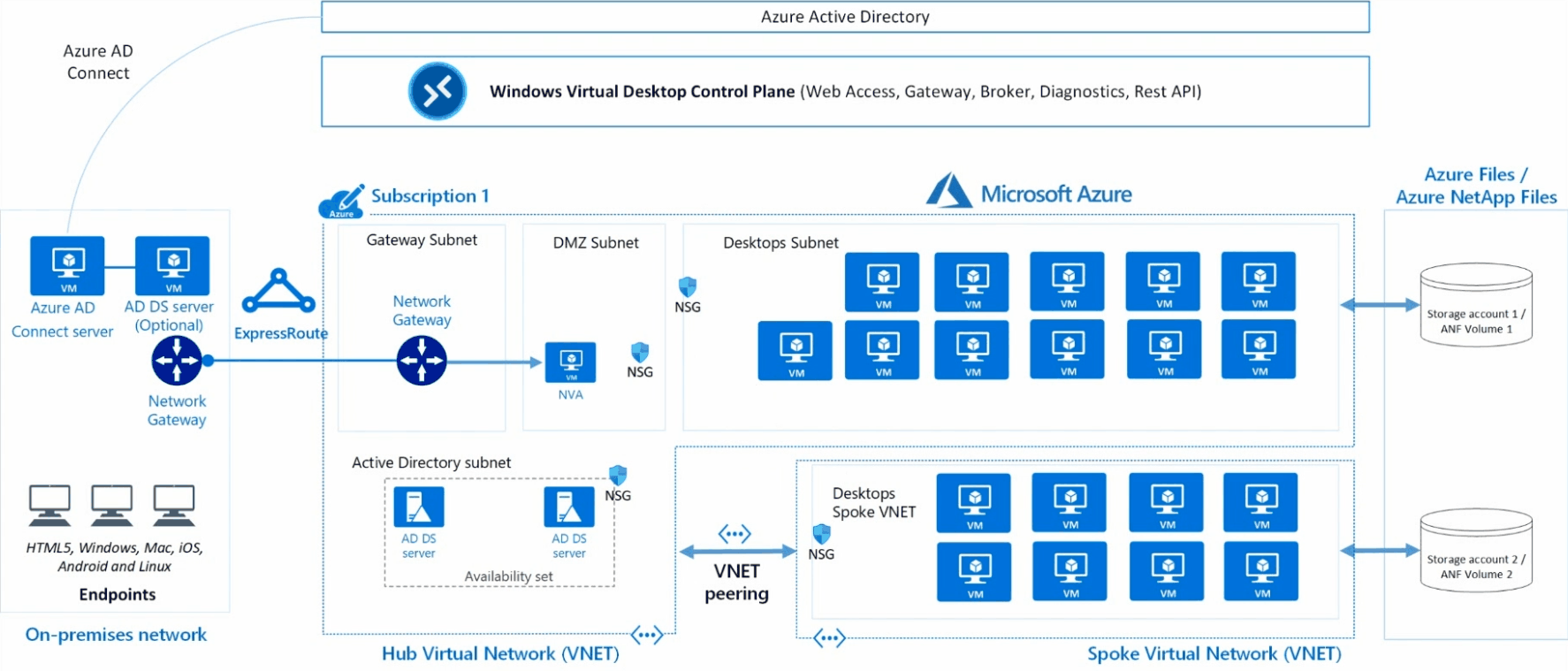
Diagram: Microsoft, Azure Virtual Desktop for the enterprise (older version), as shown in the course.
Old names in it:
- Azure Active Directory → Microsoft Entra ID
- Azure AD Connect → Microsoft Entra Connect
- Windows Virtual Desktop control plane → the Azure Virtual Desktop service (web access, gateway, broker, diagnostics, REST API), run by Microsoft
How it lines up with the lab so far:
- On-prem AD synced to Entra ID by Entra Connect.
- ExpressRoute into the hub’s gateway subnet (connecting on-prem).
- The NVA in the DMZ subnet does the job Azure Firewall does in VNet1.
- AD DS servers in the hub, like the lab’s DC.
- Session hosts in the desktops subnets (the 11 VMs the course counts), and more in a peered spoke.
- Profiles on Azure Files or Azure NetApp Files.
This older diagram puts desktops in the hub too. Microsoft’s current designs keep session hosts in spokes and the hub for shared services (gateway, firewall, DCs).
Quick reference
- Windows 365: Cloud PC per user, fixed price, managed in Intune, runs on Microsoft’s infrastructure.
- AVD: host pools in your subscription, personal or pooled, multi-session, Azure resources plus an eligible license per user.
- Both: AVD’s gateway and broker, Windows App, need internet.
 My Computer


 Getting around


